Last updated: July 2026
Losing channels on GOtv comes down to two very different problems, and the fix depends on which one you have. Either the channels vanished after a payment, or they went missing on their own and a rescan brings them back. Work out which one you have first, because the wrong fix wastes time.
On This Page
- Which problem do you have?
- Recovering channels with a rescan
- Recovering channels lost after payment
- When the channel is in a different package
- Why GOtv channels keep getting lost
- Common questions
Which Problem Do You Have?
If channels disappeared right after you paid or upgraded, it is a reactivation problem. Your payment went through, but the decoder never refreshed its authorisation, so it still thinks nothing is active. This needs a reset, not a rescan.
If channels went missing on their own, often after bad weather, a power cut, or the decoder being off for a while, it is a signal problem. This needs a rescan. Start with whichever matches your situation, since using the wrong method makes you think nothing is working.
How to Recover Missing Channels With a Rescan
A rescan takes two minutes. Press Menu, open Advanced Options, then Installation, then Tuning, then Automatic Scan, and press OK. Let it finish without switching anything off. This restores the full list in most weather-related or power-related cases.
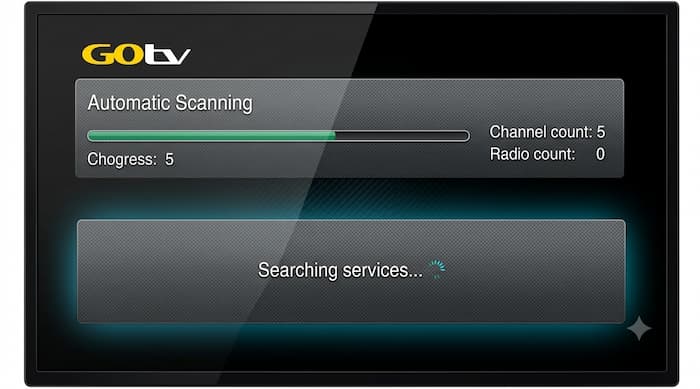
Interrupting the scan is the most common mistake. If you press buttons or switch off partway through, the channel list is left half built and you have to start again. Let it run all the way to the end, then press Exit and check your channels.
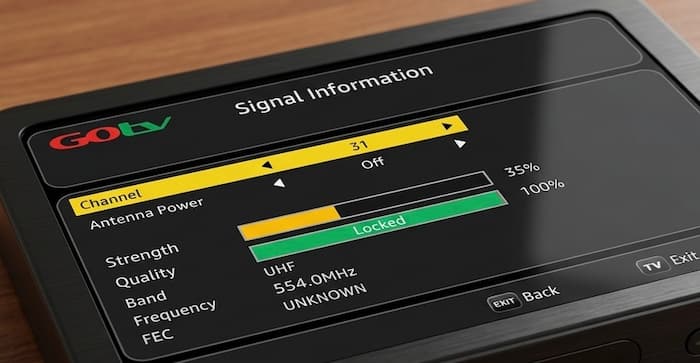
If channels went missing during bad weather and a rescan does not fully fix it, the root cause is usually a weak signal rather than the scan itself. Our guide on how to fix a GOtv antenna covers getting the signal strong enough for a clean scan. If the scan completes cleanly but channels are still missing, the problem is your subscription, so move to the next section.
How to Recover Channels Lost After Payment
When you have paid but channels will not show, the decoder needs a fresh authorisation signal. The fastest way to trigger one is by SMS: text RESET followed by your IUC number to 4688, with the decoder switched on.
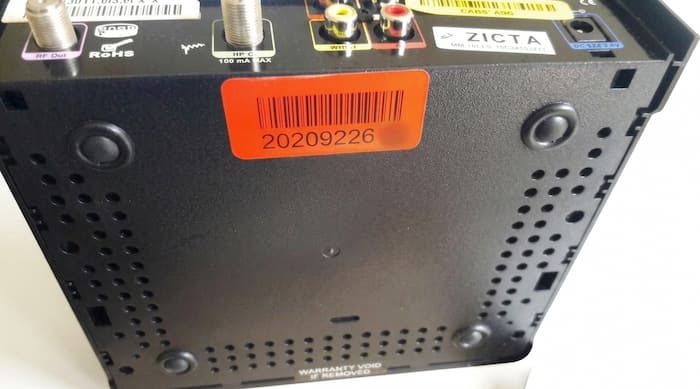
Your IUC number is the ten digit code on the sticker under or behind the decoder. Keep the decoder switched on while you do this, since the reset signal cannot reach a box that is off. The channels usually return within a few minutes, though it can take up to ten at busy times.
Reset through the MyGOtv app
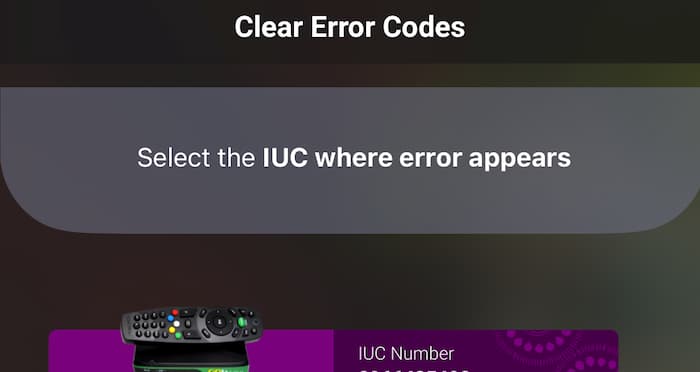
If the SMS does not go through, open the MyGOtv app, sign in with your account details, and choose the option to clear an error or reset your device. The app talks directly to your decoder, so keep the box powered on throughout. It also lets you confirm which channels your current package includes.
Does the GOtv reset code work in every country?
No. The 4688 shortcode is for Nigeria. GOtv operates across several countries, and each has its own reset number and customer care line. If you are in Kenya, Ghana, Uganda, or elsewhere, use your country’s official GOtv contact rather than 4688. Applying the Nigerian code in another market simply fails.
If channels still will not show
If you see an on-screen error code such as E16, that points to a specific reactivation fault. Our guide on fixing common GOtv decoder problems covers what each code means. If nothing works, contact GOtv customer care directly, since a payment that failed to register on their end cannot be fixed from the decoder at all.
When You Paid but the Channel Is in a Different Package
Sometimes the channel is not lost at all. It was never in your package, or your package changed at renewal. Before assuming a fault, confirm the missing channel is actually part of what you subscribe to.
Check your package’s channel list in the MyGOtv app or on the official GOtv website. If the channel sits in a higher package, the fix is an upgrade rather than a reset. This is a common source of confusion after a promotional package ends and the account drops back to a lower tier. Our breakdown of GOtv package prices and channels shows what each tier includes.
Why GOtv Channels Keep Getting Lost
If you are resetting your decoder every month, the cause is usually the same each time. Paying while the decoder is switched off is the biggest one, since the reactivation signal has nothing to reach. Turn the decoder on first, then pay, and the reset often becomes unnecessary.
Letting a subscription lapse fully before renewing forces a disconnection that has to be cleared afterwards. Frequent power cuts can interrupt the authorisation handshake too, which is where a basic surge protector pays for itself. A quick rescan every few months keeps the channel list current as GOtv adds or moves channels.
Common Questions
Why did my GOtv channels disappear after I paid?
The payment reached GOtv but the decoder did not pick up the authorisation. Text RESET and your IUC number to 4688 with the decoder switched on, or use the MyGOtv app, and the channels return within a few minutes.
Why does my GOtv show fewer channels than my package?
Either the last scan ran against a weak signal and missed some channels, or a channel was moved or dropped from your package. Run an automatic scan first, then check your package’s current channel list if specific channels are still missing.
How do I recover GOtv channels after a power cut?
A power cut usually interrupts the signal rather than the subscription. Run an automatic scan through Menu, Advanced Options, Installation, Tuning. If the scan finds few channels, check the antenna signal before scanning again.
My GOtv is showing only a few channels after a reset. What happened?
A reset triggers a fresh scan, and if the signal was weak at that moment the scan finds only the strongest channels. Fix the signal, then run the automatic scan again. Expect to rescan more than once before every channel appears.
Getting It Right in Order
Most missing channel complaints trace back to one of the first three causes, in the order listed. Rescan for channels lost on their own, reset for channels lost after payment, and an upgrade check when a channel was never in your package. A missing channel is not always a broken decoder, and knowing which category you are dealing with makes the fix far faster.
For real-time updates on any channel currently affected by a contract dispute, and for your country’s support contacts, the official GOtv Africa website is the most reliable place to confirm before you reset anything.

Frenzy valentine is a passionate blogger, developer, and entrepreneur. He is the founder and author of myfreshgists.com.
Hi after resetting my decoder,somr channels are still missing,what can I do
My gotv has been showing No Signal since two days now
After rescanning and resetting
Still my favourite channels are yet to show like channel 25 and 9
I subscribed 3600 after then I have nuisance channel that is not interesting, most of my channels disappear what could be the reason?
Hello my gotv automatic scan is not complete for over three days now pls what could be the problem
I need your customer care line pls
Hello I have done my subscription but its not showing, its only one channel that is showing
Wait for at least 2 hourse after subscription payment
Hello,I got my gotv decoder last week and I got all the channels after few days some of the channels were missing and I’ve been scanning it for days its still bring in out the same channels.I’m not happy about this
Reset your GOTV decoder
Hi…i have problems with my decoder…i have paid the subscription fee…but after three months…and during that period some channels got lost…after paying only 3 channels show and the rest still habe error codes and some are lost…what could be the problem?
Hello Stella, always pay for your GOTV subscription before due date to avoid disconnection which could result to missing channels when you finally pay. Reset your decoder to get back your full channels
Hi pls am having issues with my gotv decoder, All the channels are not showing ,am having only 31channels and my scription have not to expire, the signal strength is 70/100 . what should I do..plz
Restart your decoder and also check if the antenna power is turned on. Turn it off if its turned on and then rescan
Pls am having problem with my gotv… I have reset it but some channels are missing… Only 31 is showing…
Hello JaneFrancis, thanks for reaching out to us. To get your full channels back, rescan for channels. Ensure that you turn off antenna power
Hi I have a problem with my decoder where by my favorate local channel’s like channel 44 in Uganda are not showing and o have restarted it it only bringing few channels my no is 2017726507
Thanks
Reset your decoder
My iuc no.4623026907 please check at your end
I didnt get all my channels in gotv plus…like citizen, maisha magic, k24, Africa magic epic…kindly assist I’ve been texting you fb but you ignoring me
Hi some of the channel are missing from yesterday have restarted but still not working
Reset the decoder to get your Channels back
I have problems resetting gotv lost channels which are my favourites but in vain,customer care are not helpful. Am planning to buy a different decoder, nkt.
Please i dont i kw wat is wrong i subscribe for 1900 i i dont wat is wrong there is missing channel i reset it is not wroking
You can get your GOTV lost channels back by either resetting your decoder… Also try and pay for your subscription before it expires ..that will stop your Channels from disappearing
Please i need urgent attention, my gotv show (invalid channel number), is only 10 channels is currently working. Have repositioned the attener, but it still the same..
What can i do?
Unplug your decoder and plug it again. Scan for channels. Ensure your decoder is facing the transmitter position
My gotv is showing need to scan channels and have remote there is signal but is not working. Don’t know what to do
Check if the rf port is well connected… You may need to tear off the end that connects to the antenna
Hi please am having issues with my gotv decoder some channel are missing and I have rescan even reset it but all the same
Turn it off and on again.. If the issue continues after rescanning then contact GOTV customer care