You are driving down the road, deep into your favorite SiriusXM channel, when the sound cuts out. The screen flashes an error. You get signal back for a minute — then it drops again. If your satellite radio antenna keeps losing signal, you do not have to guess your way through a fix. This guide covers the five most common causes and exactly what to do about each one.
Work through these fixes in order. Start with the simplest ones first and rule them out before moving on to hardware checks.
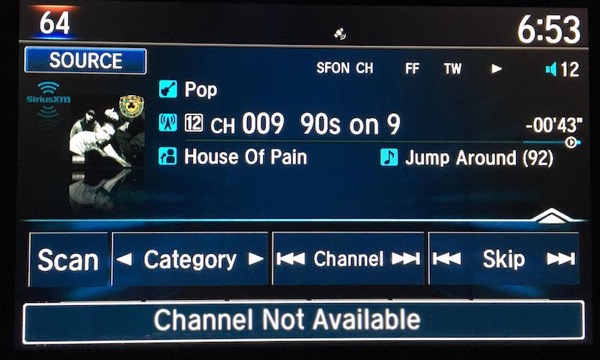
Quick Overview: Why Satellite Radio Antennas Lose Signal
Before jumping into the fixes, it helps to understand what causes satellite radio signal loss in the first place. Your SiriusXM antenna picks up a signal broadcast from satellites orbiting above the southern sky. Anything that interrupts that line of sight — or interferes with the antenna’s ability to receive the right frequency — causes a dropout. The five most common culprits are:
- Physical obstructions blocking the path between your antenna and the satellite
- A faulty, bent, or disconnected antenna that cannot receive the signal properly
- Damaged or loose wiring between the antenna, tuner, and stereo
- A failing tuner that struggles to decode the satellite data stream
- FM frequency interference from a local radio station on the same frequency as your adapter
Each fix below targets one of these causes directly.
Fix 1: Rule Out Physical Obstructions First
The most common and easiest-to-miss cause of satellite radio signal loss is a simple physical obstruction. Your antenna loses signal when something blocks its view of the sky. This happens more often than most people realize.
Signal drops are normal — and expected — in these situations:
- Driving through a tunnel
- Passing under a bridge or highway overpass
- Driving through a thick canopy of trees
- Entering a mountainous area with high terrain on both sides
- Pulling up next to tall buildings in a dense urban area
- Parking in an underground garage
When an obstruction causes the dropout, the signal returns automatically once you clear the blocked area. You do not need to do anything — just keep driving.
However, if your signal drops frequently in open areas with no obvious obstructions, a physical blockage is not the only problem. Continue to Fix 2 and work through the rest of this list to find the real cause.
According to SiriusXM, your satellite radio works best when the antenna has a completely clear view of the southern sky. If you park your car near a large building, dense tree coverage, or any tall structure, that alone can degrade your reception even without moving.
Fix 2: Inspect and Re-seat Your Antenna
If your signal drops in open areas or your radio displays an “Antenna Not Detected” error, the antenna itself is the next thing to check. This is one of the most common hardware causes of persistent signal loss.
How to check your antenna:
- Look for physical damage. Examine the antenna body for bends, breaks, or cracks. A damaged antenna will not receive a proper signal even if every other component works perfectly. If the antenna looks visibly damaged, replace it.
- Check the connection at the cradle. If you use a portable or dock-and-play SiriusXM radio, the antenna connects to a cradle. A loose antenna at the cradle is one of the most frequent causes of the “Antenna Not Detected” error. Press the antenna firmly into position and make sure it clicks or seats securely.
- Check the cable connection at the tuner. Make sure the Magnetic Mount Antenna cable is firmly plugged into your SXV300 tuner (or equivalent). A connection that is even slightly loose will cut the signal intermittently.
- Unplug and re-seat the antenna. Disconnect the antenna cable from the tuner completely, wait 10 seconds, then reconnect it firmly. This clears any poor contact at the connector and often resolves the “Antenna Not Detected” message immediately.
- Flex the cable while the radio plays. With SiriusXM running, slowly flex the antenna cable along its full length and at both connection points. Listen for any crackling, dropout, or return of signal as you flex different sections. A disruption when you flex a specific spot points to a broken wire inside the cable at that location.
- Extend the cable to its full length. A longer cable run between the antenna and the tuner generally produces better signal strength. Make sure the cable is not coiled tightly or bunched up near the antenna connection.
If the antenna looks intact but the error persists after re-seating and testing with cable flex, replace the antenna. A new SiriusXM antenna is inexpensive and replacing it is usually the fastest way to confirm whether the antenna is the source of the problem.
Fix 3: Check the Wiring Between Antenna, Tuner, and Stereo
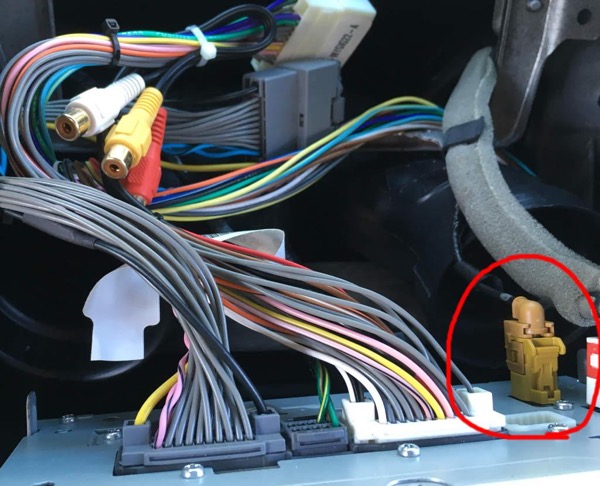
Even when the antenna itself works perfectly, a break or loose connection anywhere in the wiring chain causes the same symptoms — intermittent dropouts, poor sound quality, and frequent signal loss while driving.
There are two cable runs you need to inspect:
- The cable running from the antenna to the tuner
- The cable running from the tuner to your car stereo
A weak point, kink, or loose connector anywhere along either run degrades your signal or cuts it entirely.
How to inspect the wiring:
- Turn on SiriusXM and let it play.
- Trace every wire from the antenna to the tuner and from the tuner to the stereo.
- At every connector, gently wiggle the plug and listen for a change in audio. A crackle or dropout when you wiggle a connector means that connection is loose or corroded.
- Flex the cable along its entire length in sections and listen for disruption. These are low-voltage wires and completely safe to handle while the vehicle runs.
- Check for any visible kinks, pinch points (especially where wiring passes through a door seal or trim panel), or sections where a screw or bracket may have damaged the cable.
- If you spot a “Check Tuner” message on your display, confirm the SXV300 tuner cable is securely plugged into the head unit. Push it in firmly and check whether the message clears.
Replace any cable that produces a dropout when flexed or that shows visible physical damage. Wiring problems are a very common cause of satellite radio cutting out while driving, and they are easy to overlook because the cable can look fine externally while broken internally.
For a broader look at all the reasons your SiriusXM signal drops — including the T-Mobile frequency interference issue — read our full guide on how to fix SiriusXM radio reception and signal problems.
Fix 4: Diagnose a Faulty Tuner
The tuner module receives the satellite signal from the antenna, decodes the data stream, and converts it into the audio channels you hear. When the tuner starts to fail, it struggles with all three of those tasks — and your radio cuts out even though the antenna and wiring are in perfect condition.
A failing tuner typically produces one of these symptoms:
- A “Tuner Error” message on the display
- Channels that disappear or become inaccessible randomly
- “Channel Not Available” errors on multiple channels at once
- Signal that drops and returns unpredictably in good open-sky conditions
Important: Before concluding the tuner is faulty, rule out every other cause first. Check the antenna, re-seat all connections, inspect the wiring, and confirm your subscription is active. The tuner is only the likely culprit when everything else checks out clean.
If you see “Channel Not Available” or “Channel Not Subscribed” on one specific channel only, try other channels before assuming a tuner fault. The problem could be subscription-related or specific to that channel’s broadcast rather than a hardware failure.
Once you confirm the tuner is the issue, your options are:
- Replace the tuner module — for aftermarket setups, this is straightforward and the replacement unit is available online.
- Consult your dealership — for factory-installed OEM systems, a dealer-level diagnostic can confirm tuner failure and handle the replacement under warranty if applicable.
Fix 5: Fix FM Frequency Interference
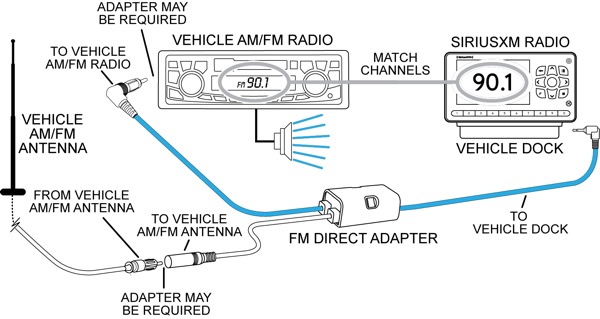
Some SiriusXM receivers — especially aftermarket add-on adapters — work by broadcasting your satellite audio to your car stereo over a short-range FM signal. You tune your car radio to a specific FM frequency, and the adapter transmits the satellite audio on that same frequency.
This setup works well at home. But as you travel to a different city or region, a local FM radio station may broadcast on the same frequency your adapter uses — and that station’s signal overpowers your SiriusXM audio, causing static, poor sound quality, or complete signal loss.
How to fix FM frequency interference:
- Press the Menu button on your SiriusXM adapter and find the setting that shows the current FM broadcast frequency it transmits on. Write it down.
- Check your car stereo to confirm it is tuned to that exact same frequency.
- If the frequencies match but audio is still poor, slowly tune your car stereo up or down by one or two increments. An FM station broadcasting very close to your adapter’s frequency can bleed in and cause interference even when the settings look correct.
- Visit SiriusXM’s FM frequency finder tool and enter your current zip code to locate the clearest available frequency in your area.
- Set your adapter to the new clear frequency, then retune your car stereo to match.
This fix only applies to aftermarket FM-based adapters. If your SiriusXM receiver connects directly to your car’s audio system — through an auxiliary input, direct wire connection, or factory integration — FM interference does not apply and you can skip this fix.
Bonus: Power Cycle Your Radio Before Anything Else
Before you work through any of the five fixes above, try the quickest possible reset first: turn off your SiriusXM head unit completely, wait 10 to 30 seconds, then turn it back on. This restarts the antenna and clears minor software glitches that can trigger error messages even when your hardware is fine.
This simple step resolves a surprising number of “Antenna Not Detected” and “No Signal” errors on its own. If it works, you save yourself 20 minutes of troubleshooting. If it does not work, move through the five fixes above in order.
What the Error Messages Mean at a Glance
| Error Message | Most Likely Cause | First Step |
|---|---|---|
| No Signal | Obstruction, antenna placement, or subscription lapse | Move to open area, check antenna position |
| Antenna Not Detected | Loose or disconnected antenna cable | Unplug and re-seat antenna at tuner |
| Check Antenna | Damaged antenna or broken cable | Inspect antenna and flex cable to find break |
| Tuner Error | Failing tuner module | Rule out wiring and antenna faults first, then replace tuner |
| Unsubscribed Channel | Subscription lapsed or radio needs refresh | Verify subscription, then send a refresh signal |
| Channel Not Available | Channel-specific issue or tuner fault | Try other channels to confirm it is not channel-specific |
| Acquiring Signal | Temporary obstruction or signal reacquisition after dropout | Wait — usually self-resolves within 30 to 60 seconds |
Frequently Asked Questions
Why does my satellite radio keep cutting out while driving?
The most common reasons are physical obstructions (tunnels, buildings, trees), a loose or damaged antenna connection, a kinked or broken cable between the antenna and tuner, or FM frequency interference from a local station. Work through the five fixes above in order to pinpoint and resolve the specific cause.
What does “Antenna Not Detected” mean on SiriusXM?
It means your tuner has lost communication with the antenna. This usually points to a loose antenna connection at the cradle or tuner. Unplug the antenna cable, wait 10 seconds, and reconnect it firmly. If the error persists, inspect the cable for damage and try a replacement antenna.
Why does my SiriusXM signal drop in the same spot every time?
If you lose signal in the exact same location repeatedly, T-Mobile cell tower interference is a strong possibility. T-Mobile’s 2100 MHz band sits close enough in wavelength to SiriusXM’s frequency range that a nearby tower can overpower your reception. A notch filter or a higher-quality antenna tuned more precisely to SiriusXM’s frequency range helps reduce this interference. Read more in our detailed guide on fixing SiriusXM reception and signal problems.
How do I know if my SiriusXM antenna is bad?
Signs of a bad antenna include persistent “Antenna Not Detected” or “Check Antenna” errors that do not clear after re-seating the cable, a dropout that occurs when you flex the antenna cable near the antenna connection, visible physical damage to the antenna body, or complete signal loss in open areas where reception should be strong.
Can bad wiring cause satellite radio signal loss?
Yes — and it is one of the most underdiagnosed causes. A single kink, pinch point, or loose connector anywhere along the cable run from antenna to tuner to stereo causes intermittent dropouts that look exactly like an antenna or reception problem. Flex the full length of every cable while the radio plays and listen for any change in audio.
Should I replace the antenna or the tuner first?
Replace the antenna first. It is less expensive and faster to replace, and antenna faults are far more common than tuner failures. If a new antenna does not solve the problem and all wiring checks out clean, then replace the tuner.
Final Word
A satellite radio antenna that keeps losing signal almost always has a fixable cause. Start with a quick power cycle, then move through the five fixes in order — obstruction check, antenna inspection, wiring check, tuner diagnosis, and FM frequency adjustment. Most users resolve the issue at Fix 1, 2, or 3 without touching the tuner at all.
If you also deal with intermittent signal loss from cell tower interference or need to send a refresh signal to restore missing channels, our full guide on how to fix SiriusXM radio reception and signal problems covers both in detail.
Found the fix that worked for you? Drop a comment below and let other readers know which step solved it.

Frenzy valentine is a passionate blogger, developer, and entrepreneur. He is the founder and author of myfreshgists.com.
1 thought on “5 Fixes To Try when Sirius xm Radio Antenna Keeps Loosing Signal”