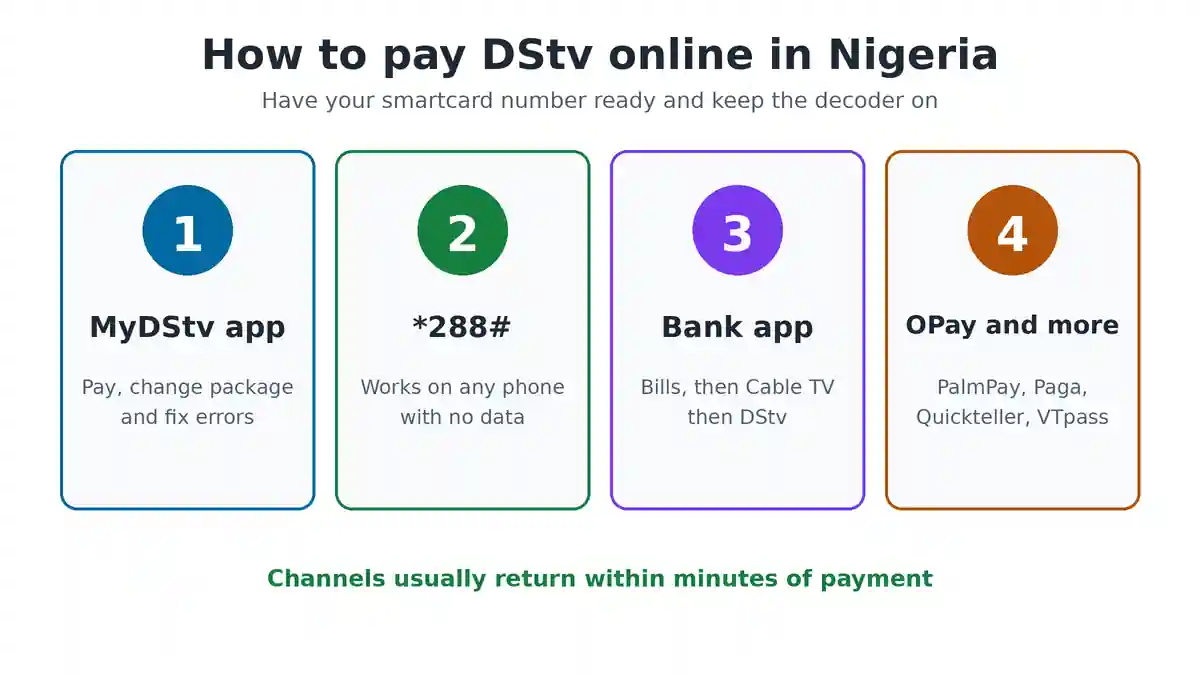
You can pay DStv online in Nigeria in about two minutes, from your phone, without visiting any office. The quickest ways are the MyDStv app, the *288# USSD code, your bank app, or a payment app such as OPay or Quickteller. All you need is your smartcard number and the right amount for your package.
This guide shows each method step by step, the amount to pay after the new packages start on 5 November 2026, and what to do if your channels do not come back after payment.
What You Need Before You Pay DStv Online
- Your smartcard number. It is the 10 digit number printed on the card inside your decoder. You can also see it on your decoder screen under Information, or in the MyDStv app.
- The right amount. Check your package price first, because paying less than the full amount may not reconnect you.
- A funded card, bank account or wallet. Any Nigerian debit card, bank app or payment wallet works.
- Your decoder switched on. Leave it on while you pay, so it can receive the signal that turns your channels back on.
How Much to Pay for DStv From 5 November 2026
MultiChoice is replacing the old bouquets with four new packages on 5 November 2026. These are the new monthly prices.
| Package | Monthly price |
|---|---|
| DStv Starter | ₦6,000 |
| DStv Select | ₦11,000 |
| DStv Sports | ₦21,000 |
| DStv Premium | ₦44,500 |
Until then, the old prices apply: Padi ₦4,400, Yanga ₦6,000, Confam ₦11,000, Compact ₦19,000, Compact Plus ₦30,000 and Premium ₦44,500. Existing subscribers will be moved to a new package automatically, in phases. So after 5 November, open the MyDStv app to see your new package and its price before you pay. For the full breakdown, read our guide to DStv packages and prices in Nigeria.
How to Pay DStv Online With the MyDStv App
The MyDStv app is the official DStv app for paying and managing your account. It is free on the Google Play Store and the Apple App Store, and it shows your exact amount due.
- Download the MyDStv app and open it.
- Choose Nigeria as your country.
- Sign in with your surname or registered phone number, plus your smartcard number.
- Check the amount due on the home screen.
- Tap Pay, then choose card, bank transfer or another option shown.
- Confirm the payment with the code your bank sends you.
Your channels usually come back within a few minutes. The app also lets you change your package, clear error codes and see your payment history, so it is worth keeping on your phone.
How to Pay DStv With the *288# USSD Code
The *288# code is the MultiChoice self service menu. It works on any phone, even a small button phone, and you do not need data.
- Dial *288# from the phone number linked to your DStv account.
- Choose DStv from the menu.
- Enter your smartcard number when asked.
- Pick the payment option and follow the prompts.
- Approve the payment from your bank account.
Menu numbers change from time to time, so read each screen before you reply. The same menu can also show your balance and due date.
How to Pay DStv With Your Bank USSD Code
Most Nigerian banks let you pay DStv from their own USSD code, under bills or payments. For example, GTBank customers can dial *737#, and other banks have their own codes.
- Dial your bank’s USSD code from the phone number linked to your account.
- Choose Pay Bills, Bills Payment or Payments.
- Pick Cable TV, then DStv.
- Enter your smartcard number and the amount.
- Confirm with your PIN.
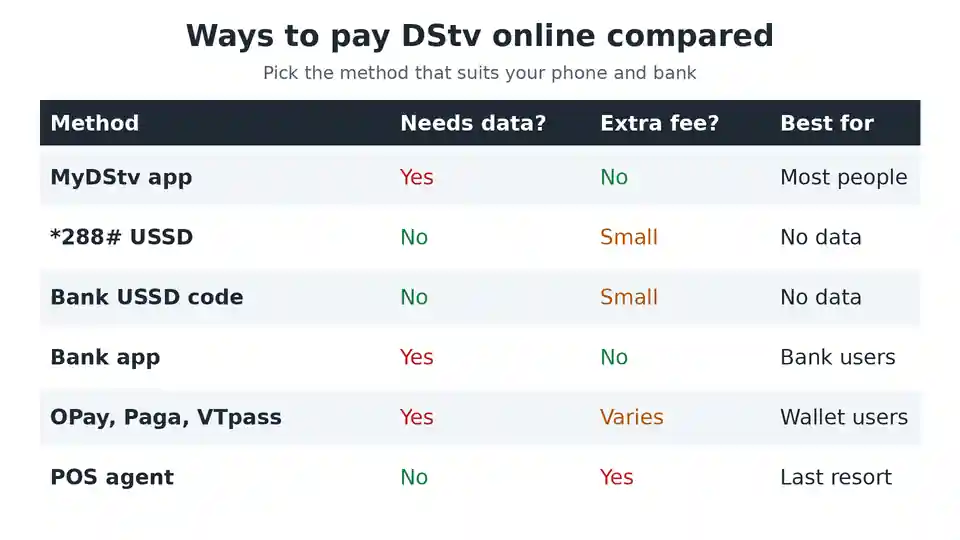
Banks charge a small fee for USSD sessions, which is deducted by your network or bank. Check the receipt message for the transaction reference, in case you need it later.
How Do I Pay My DStv Account Using a Phone App?
If you already use mobile banking or a payment wallet, this is often the easiest way.
Pay DStv in your bank app
- Log in to your bank app.
- Tap Bills, Pay Bills or Payments.
- Select Cable TV, then DStv.
- Enter your smartcard number. The app usually shows the account name so you can confirm it.
- Pick your package or type the amount, then confirm with your PIN.
This works in the apps of most major banks, including GTBank, Access, Zenith, First Bank and UBA.
Pay DStv with OPay, PalmPay, Paga, Quickteller or VTpass. These apps all list DStv under bills or TV. Open the TV or Cable section, choose DStv, enter your smartcard number, select your package and pay from your wallet or card. Some of them give small cashback offers, so compare before you pay.
How to Pay DStv on the DStv Website
If you are on a laptop, you can pay on the official DStv Nigeria website.
- Go to the DStv Nigeria website and open My Account or Self Service.
- Sign in with your surname or phone number and smartcard number.
- Choose Pay or View Balance and Pay.
- Enter your debit card details and confirm with the code your bank sends.
Only pay on the official site or a well known payment app. Fake pages and social media accounts sometimes claim to offer DStv discounts. Never send money to a personal account for a DStv subscription.
Other Ways to Pay DStv Without the Internet
You can still pay DStv the old way. Many POS agents can pay DStv bills for a small fee. Give them your smartcard number and the amount, then wait for the confirmation before you leave. DStv dealers and MultiChoice service centres can also take payment. Find the nearest one in our list of DStv service centre addresses and self service options.
How to Pay for Someone Else’s DStv
You can pay for a parent or relative in another city with any of these methods. Just enter their smartcard number instead of yours. Most apps show the account name before you pay, so check it matches. You do not need their phone or password.
DStv Payment Not Reflecting? Do This
Most payments reflect within minutes. If your channels are still off, work through these steps in order.
- Switch the decoder on and leave it on a DStv channel for about 15 minutes.
- Check the amount. If you paid less than your package price, the account may not reconnect. Pay the balance.
- Clear the E16 error from the MyDStv app or website. Choose Fix Errors, then the error shown on your screen. Our guide on how to clear E16 and other DStv error codes shows each step.
- Reset the decoder if channels are still scrambled. See how to activate and reset your DStv decoder after payment.
- Check that the payment landed. Look at your balance using our guide to checking your DStv balance.
- Contact DStv with your receipt if the money left your account but the balance did not change. Keep the transaction reference ready.
Which Way to Pay DStv Is Best?
For most people, the MyDStv app is best because it shows the exact amount due and lets you fix errors in the same place. Use *288# or your bank USSD code if you have no data. Use your bank app or OPay if you already pay other bills there. Keep POS agents for when nothing else works, because they add a fee.
Whichever you pick, pay a day or two before your due date. That way you avoid losing channels in the middle of a match.
Common Questions
How do I subscribe to DStv online?
If you already have a decoder, pick your package in the MyDStv app and pay with your card or bank. New customers can buy the decoder bundle from a dealer first, then pay online each month.
What is the DStv USSD code for payment?
Dial *288# for the MultiChoice self service menu. You can also pay through your own bank USSD code under bills payment.
How do I renew my DStv subscription?
Renewing is the same as paying. Pay your package amount by any method above before your due date, and your service continues.
Can I change my package when I pay?
Yes. In the MyDStv app, change your package first, then pay the new amount. Follow our steps on how to change your DStv package online.
How do I check when my DStv expires?
Open the MyDStv app or dial *288#. You can also see our guide on checking your DStv expiry date.
Is the payment the same for GOtv?
The steps are almost the same, but GOtv uses an IUC number instead of a smartcard number. See our guide on paying for GOtv.
Pay DStv Online in Nigeria the Easy Way
To pay DStv online in Nigeria, have your smartcard number ready, check your package price, keep the decoder on, and pay through the MyDStv app, *288#, your bank or a trusted payment app. Your channels should return within minutes. To confirm prices or find more payment options, visit the official DStv Nigeria website.

Frenzy valentine is a passionate blogger, developer, and entrepreneur. He is the founder and author of myfreshgists.com.
2 thoughts on “How to Pay DStv Online in Nigeria (2026): App, USSD, Bank and OPay”