Your GOtv IUC number is the 10 digit number that identifies your decoder and your account. You need it to pay, to clear an error code, to check your balance and to speak to customer care. Here is where to find it in under a minute, and everything you use it for.
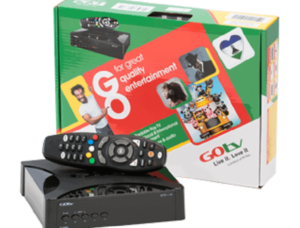
What Is a GOtv IUC Number?
The IUC is a unique 10 digit code linked to one decoder. It works like an account number: no two decoders share one, and the company uses it to send your subscription and resets to the right box.
You may also hear it called the customer number or the decoder number. Both mean the IUC number. If a payment agent or customer care asks for either, give them your IUC.
How to Find Your GOtv IUC Number
There are two quick ways. Look at the sticker under or behind your decoder, or open the information screen from the decoder menu.
On the decoder sticker
Turn the decoder over. The IUC number is printed on a sticker on the bottom or the back, usually marked IUC. It is 10 digits long.
On your TV screen
- Press Menu on the GOtv remote.
- Scroll to Information Central, or Information on some models, and press OK.
- The IUC number appears on screen, often in the top corner.
Write the number down, or take a photo of the sticker, so you never have to turn the decoder over again.
What You Use the GOtv IUC Number For
- Paying your subscription. Every payment, by bank app, USSD, agent or the MyGOtv app, goes to an IUC number.
- Clearing error codes. A reset for E16 and similar codes is sent to your IUC number through self service.
- Checking your balance and due date. Self service and the MyGOtv app use your IUC to show what you owe.
- Changing your package. Upgrades and downgrades are made against your IUC.
- Customer care. It is the first thing an agent asks for, so have it ready.
- Activating a new decoder. GOtv links your new decoder to your details using its IUC.
For a reset after payment, our guide to GOtv error codes explains the steps for each code.
Paid to the Wrong Number?
A payment to a mistyped IUC number goes to someone else’s decoder, so your own channels stay off. Contact GOtv customer care with the payment details as soon as you notice.
Always check the 10 digits twice before you pay, especially when paying for a relative. Our guide on resolving a wrong GOtv payment explains what to do and what proof to have ready.
Keep Your IUC Number Private
Anyone with your IUC number can pay into your account, which is harmless. However, scammers sometimes use it to pose as GOtv staff and ask for card details or a fee. GOtv does not ask for your bank PIN or card number over the phone or WhatsApp. Do not post your IUC number in public comments either.
If you need help, use GOtv’s official channels only. Our list of GOtv offices and self service options shows where to go.
Common Questions
How many digits is a GOtv IUC number?
Ten digits. If you have a different length, you may be reading another number from the sticker, such as the model or serial code.
Is the IUC number the same as a smartcard number?
No. GOtv uses the IUC number. Many DStv decoders also use a smartcard number, printed on the card inside the decoder, and DStv lets you use either for payments and resets.
Can I check my IUC number online?
The quickest way is the decoder itself, either the sticker or Menu and then Information Central. If you have used the MyGOtv app before, it also shows the IUC linked to your account.
Keep It Where You Can Find It
Your IUC is on the sticker under the decoder and on the information screen in the menu. Save a photo of it, double check it every time you pay, and never share it with anyone who also asks for your bank details.
For payments and self service in your country, visit the official GOtv Africa website.

Frenzy valentine is a passionate blogger, developer, and entrepreneur. He is the founder and author of myfreshgists.com.
Set up my phone got ok
Thanks keep visiting for more update