Your screen goes black with a message saying no signal, and the code E48-32 in the corner. It is one of the most common DStv errors, and it usually has a simple cause.
This guide explains what E48-32 actually means, how to tell in a minute where the problem sits, and the fixes to try in order. It also covers the cases other guides skip: when only one channel shows E48-32, and when only your Extra View decoder has it.
On This Page
- What does E48-32 mean on DStv?
- One channel or all channels?
- How to fix E48-32, step by step
- E48-32 when it rains
- E48-32 on only one decoder (Extra View)
- E48-32 on an Explora
- E48-32 is not a payment problem
- When to call an installer
- Common questions
What Does E48-32 Mean on DStv?
E48-32 means your decoder is not receiving a usable signal from the satellite dish. It is a signal error, not a subscription error. The cause is almost always outside the decoder: the cable, the LNB on the dish, the dish position, the weather, or the wrong satellite setting.
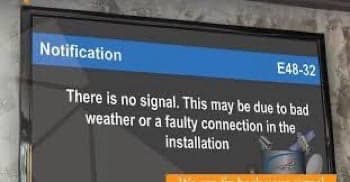
Think of it as the decoder saying “I am working, but nothing is coming down the cable.” That narrows your search a lot. You are looking for something between the decoder and the sky.
E48-32 is different from a TV that shows “No Signal” on a plain blue or black screen without any DStv code. That message comes from the TV itself and means the TV is on the wrong input or the HDMI cable is loose. Press the Source or Input button on your TV remote and pick the right HDMI port.
One Channel or All Channels?
Change to a few different channels before you touch anything. If every channel shows E48-32, the problem is your dish, cable or settings. If only one or two channels show it while others work, the problem is usually with that channel’s transmission, not your equipment.
This one check saves a lot of wasted effort. DStv channels are carried on different frequencies from the satellite. A single channel can go off air, move frequency, or have a temporary fault at DStv’s end. Your decoder then shows E48-32 on that channel only.
If only some channels are affected:
- Wait 30 minutes and try again. Transmission faults are often fixed quickly.
- Restart the decoder at the wall so it rechecks the channel list.
- If the same channels stay down for a day, run the installation wizard again so the decoder picks up any frequency changes.
- If a whole group of channels is down, check DStv’s social media pages in your country for a service notice.
If every channel shows E48-32, work through the steps below.
How to Fix E48-32, Step by Step
Restart the decoder, then check the cable connections at both ends, then look at the signal reading, then the dish and LNB. Work in this order because it goes from quickest to hardest, and most E48-32 errors clear in the first three steps.
Step 1: Restart the decoder properly
Pressing standby is not a restart. Switch off at the wall, unplug the decoder, and wait 60 seconds. Plug it back in, switch on, and give it a few minutes to start fully. This clears temporary glitches, especially after a power cut.
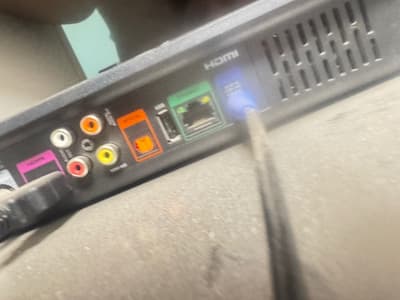
Step 2: Check the cable at the back of the decoder
Find the satellite cable, usually in a socket labelled LNB IN, Dish IN or similar. Unscrew it, check the thin centre wire is straight and not broken, then screw it back on firmly by hand. A cable that has been knocked loose behind the TV stand is one of the most common causes of E48-32.
Step 3: Check the signal reading
Press the i or Help button on the remote, or go to Settings, then Satellite Settings, to see the signal screen. This tells you what kind of problem you have:
- Both strength and quality at zero: nothing is arriving. Suspect the cable or LNB first.
- Strength showing but quality at zero: the decoder is receiving a signal, but not DStv. Suspect the satellite setting or the dish position.
- Both low and jumping around: the signal is weak. Suspect a wet connector, the LNB, or a dish that has moved slightly.
Our guide on how to fix signal strength on DStv explains the readings in detail and shows where your dish should point.
Step 4: Check the cable outside and the connector at the dish
Follow the cable from the decoder to the dish. Look for cuts, sections crushed by a door or window, and places where the outer cover has cracked in the sun. Then unscrew the connector at the LNB on the dish. If it is wet, green or rusty inside, water has got in, which blocks the signal.
Cut back to clean cable and fit a new F connector. Then wrap the outdoor joint with self amalgamating tape so rain cannot get in again.
Step 5: Check the satellite setting
If anyone reset the decoder or ran the installation wizard recently, it may now be looking for the wrong satellite. That alone is enough to cause E48-32 on every channel.
Our guide to fixing DStv not scanning lists the correct satellite for your country and walks through the installation wizard.
Step 6: Look at the dish
From the ground, check whether the dish has turned, tilted, or been pushed. Look for a bent arm or loose bolts. Also look for something new in its path, such as a tree branch, a water tank or a new wall. A small movement is enough to cause E48-32 on every channel.
Realigning needs care and a second person watching the signal screen. Do not climb onto a roof alone, or in wind or rain.
Step 7: Replace the LNB
Is the cable good, the setting right and the dish where it should be? If the signal is still zero, the LNB has probably failed. LNBs wear out from sun, water and lightning strikes nearby. A new LNB costs far less than a new decoder. Our guide on how to fix an LNB on a satellite dish explains how to test and swap it.
E48-32 When It Rains
Heavy rain weakens the satellite signal before it reaches your dish, and the decoder shows E48-32 until the rain eases. This is called rain fade. It is normal, and the picture returns on its own. Do not reset the decoder or move the dish during a storm.
If E48-32 appears with only light rain or a cloudy sky, your signal has too little margin. That points to a dish slightly off target, a wet connector, or an ageing LNB. Fix it on a dry day, and the picture will hold through most storms.
Has the rain stopped for an hour and the error is still there? Check whether the wind moved the dish. Then check the connector at the LNB for water.
E48-32 on Only One Decoder (Extra View)
If your main decoder works but the Extra View decoder shows E48-32, the dish is fine. The problem is the cable or LNB connection that feeds the second decoder. Each decoder needs its own working signal path from the dish.
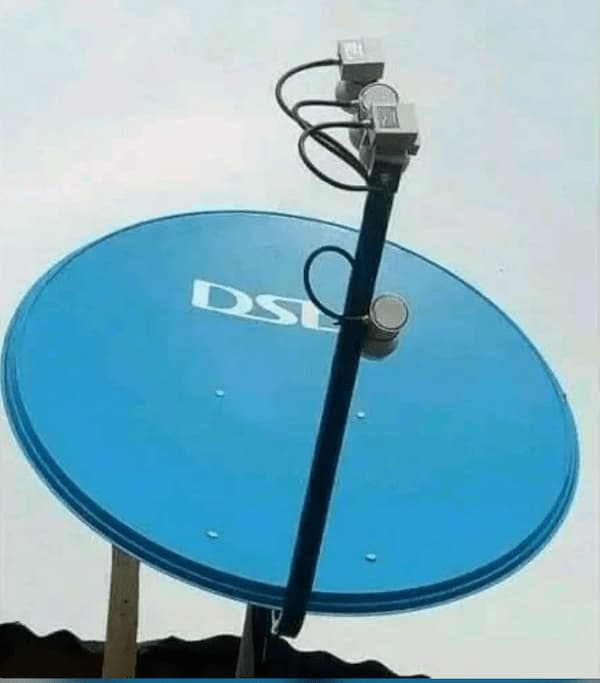
An Extra View setup uses an LNB with more than one output, or a smart LNB, or a switch that splits the signal. When only one decoder fails, look at its own route:
- Check the cable to the second decoder at both ends, including the connector at the LNB.
- Swap the two cables at the LNB. If the fault moves to the other decoder, that LNB output has failed. If it stays, the cable to the second decoder is faulty.
- If you use a switch or splitter, connect the second decoder directly to a spare LNB output to test.
- Confirm the second decoder’s satellite and LNB settings match the main decoder.
If both decoders show E48-32 at the same time, the shared dish or LNB is the likely cause. Treat it as a normal E48-32 and start from Step 1.
E48-32 on an Explora
An Explora can show E48-32 on some activities but not others, such as live TV working while a recording fails. This usually means one of its signal feeds is missing. Depending on the setup, an Explora takes two cables from a twin LNB, or a single cable from a smart LNB.
On a two cable setup, check that both cables are connected at the decoder and at the LNB. Both connectors should be dry and tight. On a smart LNB setup, check that the installation settings still match the smart LNB. A reset can change them back to the wrong type.
The signal screen on an Explora shows readings for each tuner. If one tuner reads zero while the other is fine, the cable or LNB output for that tuner is the problem.
E48-32 Is Not a Payment Problem
E48-32 has nothing to do with your subscription. Paying again or sending a reset from DStv self service will not clear it. The reset travels by satellite, and your decoder is not receiving the signal it would arrive on.
This is the most common mistake people make with this error. A subscription problem shows a different code, usually E16 on a channel you have not paid for. Once your signal is back, if channels then show E16, send a reset from your DStv app, the DStv website or your country’s USSD code. Our guide to fixing DStv channels not showing covers that step.
When to Call an Installer
Call an accredited DStv installer if:
- The signal reads zero after you have checked the cable, connectors and settings.
- The dish is on a high or steep roof.
- The dish arm or bracket is bent or broken.
- You have replaced the LNB and still have no signal.
Tell the installer what you have already checked. It saves time and stops you paying for steps you have done yourself.
Common Questions
What does E48-32 mean on DStv?
It means the decoder is not receiving a usable signal from the dish. The cause is usually a loose or wet cable, a failed LNB, a moved dish, heavy rain, or the wrong satellite setting.
How do I clear E48-32 on DStv?
Restart the decoder at the wall, tighten the satellite cable at both ends, and check the signal screen. If the signal is still zero, check the connector at the dish, the satellite setting and the LNB.
Why is E48-32 showing on only one channel?
That channel is usually having a transmission problem or has moved frequency. Wait a while, restart the decoder, and rescan with the installation wizard if it lasts more than a day.
How long does E48-32 last in rain?
Usually only while the heavy rain lasts. The signal returns as the rain eases. If it lasts long after the rain stops, check the dish and the connector at the LNB.
Will paying my subscription fix E48-32?
No. E48-32 is a signal error. Your subscription can be fully paid and you will still see E48-32 until the signal problem is fixed.
Why does my Extra View decoder show E48-32 but the main one works?
The cable or LNB output feeding the second decoder has a fault. Swap the cables at the LNB to find out which one is to blame.
Does E48-32 work the same on DStv HD and Explora?
Yes, the meaning is the same on both. An Explora also has more than one tuner, so it can show the error on one activity while another still works.
The Short Version
E48-32 means no usable signal is reaching your decoder. First check whether all channels or only some are affected. Restart the decoder at the wall, tighten the cable at both ends, and read the signal screen. Then check the connector at the dish, the satellite setting, the dish position and the LNB, in that order.
Ignore it during heavy rain, because it clears on its own. Remember it is never a payment problem. For account help once your signal is back, use the official DStv self service portal.

Frenzy valentine is a passionate blogger, developer, and entrepreneur. He is the founder and author of myfreshgists.com.
Not happy with error 48_32 may you tell us what to do on extra view
Having problems with my extra view error 48_32 what should I do
Extraview connection is having error 48_32 what should I do
I haven’t been able to watch TV for the past week
Devoder displaying 100% be2 not 100%mac
Decoler have an error in booting showing 100% be2 instead of 100% mac