A DStv decoder communicates through the small lights on its front panel long before anything shows up as an error message on screen. Whether it’s one light stuck on a single color or all three flashing together, each pattern points to a specific, fixable cause.
This guide walks through what each light and combination actually means, in the order you should check them, so you can fix most of these without a technician visit.
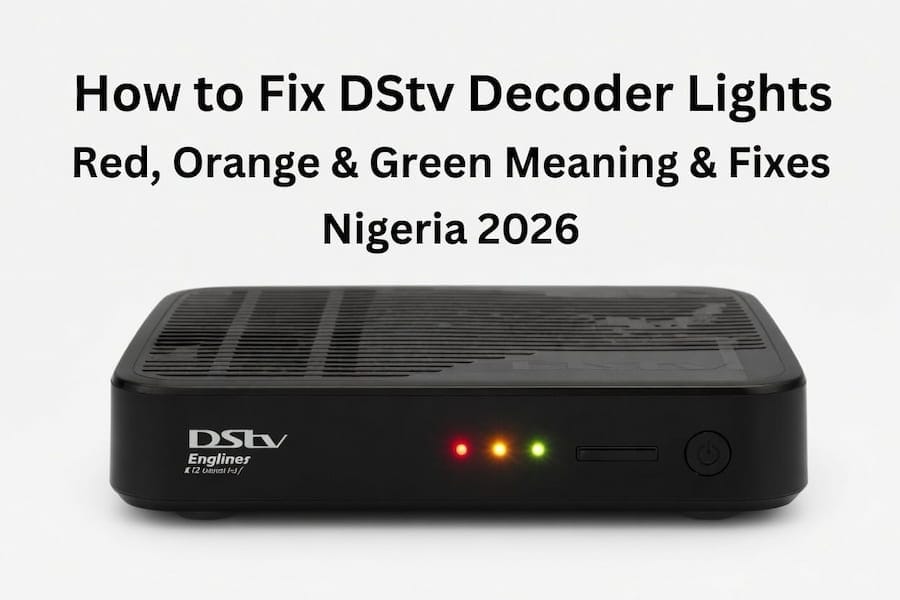
What Each Light Color Means
Green generally signals that the decoder is fine or sitting in standby mode. Orange or yellow usually points to a temporary authorization or signal issue rather than a serious fault. Red is the most serious of the three, typically meaning the decoder has no usable signal or has hit an error state.
Weather and power conditions make these patterns more common in some regions than others. Storms, strong winds that nudge the dish slightly, and sudden power interruptions are common triggers, and they tend to produce very similar light patterns regardless of exactly what caused them.
All Three Lights Flashing Together
This is the most alarming pattern to see, and it usually means the decoder has lost communication with the dish or Smart LNB entirely. It shows up most often after storms, wind strong enough to nudge the dish out of position, or a power cut that interrupts the signal handshake mid-process.
How to Fix DStv Remote Not Working in Nigeria (Updated 2026 Guide)
Fix Sequence for All Three Lights
Unplug the decoder from the wall socket directly, rather than switching it off with the remote or the front panel button, since only a full power cut clears this particular fault. Wait a full 60 seconds before plugging it back in, giving the internal components time to fully discharge.
While you wait, check the cable connections between the dish, Smart LNB, and decoder for anything loose or visibly damaged. Once power is restored, leave the decoder alone for three to five minutes while it fully restarts and attempts to reconnect, resisting the urge to press buttons during this window. If the lights are still flashing afterward, log into the self-service portal and refresh your subscription, since the decoder sometimes needs a fresh authorization signal from the server to fully clear the fault.
Red Light Flashing or Solid
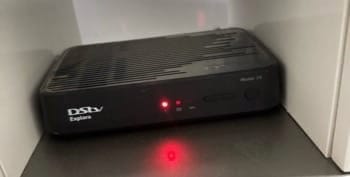
A red light is the decoder’s way of reporting that it cannot get a usable signal from the dish. This shows up frequently after bad weather, a shifted LNB cable, or a dish that has drifted out of alignment over time.
Start with the same 60-second power cycle described above. If the red light persists, check your signal strength and quality through the menu, generally under Settings, then Satellite Settings. Aim for signal strength around 60 percent and quality as close to 100 percent as possible. If either number is low, check and tighten every cable between the dish, Smart LNB, and decoder before assuming a bigger problem exists. If signal still looks poor after that, use the self-service portal to clear any lingering error codes, since the decoder can sometimes stay in an error state even after the physical issue is resolved.
Orange or Yellow Light Flashing
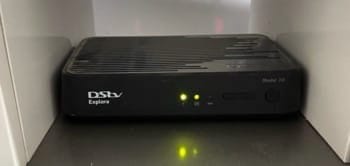
Orange typically appears when the decoder has a temporary subscription or authorization issue, even shortly after a successful payment. It’s effectively the decoder asking to reconfirm its status with the main server, which commonly happens right after a payment, a package change, or a long period powered off.
Log into the DStv self-service portal using your correct smartcard number, since mixing up numbers across multiple cards is a common mistake. Select the option to refresh your subscription or clear error codes, then leave the decoder powered on and undisturbed for 15 to 30 minutes. Rebooting repeatedly during this window can actually reset the refresh process and make the wait longer rather than shorter.
Green Light Flashing With No Picture
A flashing green light with nothing showing on screen usually means the decoder is stuck in a loading loop or waiting on a pending update, rather than facing an actual signal problem. This is most common after a power interruption or an extended period switched off.
Power cycle the decoder for 60 seconds first, since this clears most loading loops on its own. Confirm the HDMI cable is firmly connected at both ends, trying a different port on the TV if one is available, since a loose HDMI connection produces exactly this symptom. If you made a payment recently, give it up to 30 minutes to fully process before assuming something else is wrong, and check the decoder’s menu for any pending software update that may simply be taking longer than expected to finish.
Working Through Combined Light Patterns
When two lights flash together, such as red and orange, it usually means a signal problem and a subscription issue are happening at the same time. Work through the fixes in order rather than picking one: power cycle first, check signal strength second, and refresh through the self-service portal last. Skipping ahead can make it look like a step failed when it just hadn’t been given time to take effect yet.
If you use XtraView with two decoders, a fault on one unit can cause lights to flash on the other as well, so reboot both together rather than troubleshooting them separately.
Preventing Repeat Light Problems
A few habits meaningfully cut down how often these patterns come back. Reboot the decoder roughly every two weeks even when nothing seems wrong, and protect outdoor cable connections from rain and dust with a simple wrap or cover. A basic surge protector or small uninterruptible power supply goes a long way in areas with frequent power fluctuations, since sudden voltage spikes are a common cause of decoder faults over time. Keep the decoder itself somewhere ventilated, since heat buildup inside a closed cabinet can contribute to the same instability that shows up as flashing lights.
Most flashing light patterns resolve with a power cycle, a cable check, or a subscription refresh, worked through in that order rather than at random. If you’ve tried all three and confirmed good signal strength in the menu with no change, that’s the point where a dish alignment check or a technician visit makes more sense than continuing to troubleshoot alone. For related problems like distorted picture or missing sound that often show up alongside these light patterns, our guide to fixing DStv Explorer decoder problems covers the next steps. For subscription refreshes and error code clearing directly, use the official DStv self-service portal.

Frenzy valentine is a passionate blogger, developer, and entrepreneur. He is the founder and author of myfreshgists.com.
What does it mean when the three lights are showing steady and what’s the solution
What if my decoder turn off for many years can still work on or what?
my decoder does not want to change the colour red I’ve been pressing it manual and remotely but it does not change the red colour.what must I do please help
Good day … my decoder model 65 and it shows green light but on screen there nothing
My decorder is showing a orange standby light
MY DECODER IS NOT POWERED AND IT SHOWS A ORANGE LIGHT AT THE BACK
My decoder is keep on showing me a red light and orange light and does not show any channel ,I don’t know what to do?
My decoder is keep on showing me red light and orange light does not show any channel ,even if I press on a reset button nothing is happening,what must I do?
My decoder has been showing the Orange light its now four days its stack and the remote is not working or the reset button on the decoder
My decoder which is the old DStv decoder where you insert smart card,hasn’t been working for the past 3days. The orange light is permanently on and the remote doesn’t help. My TV just shows no signal continuosly. I’ve tried everything even the installation guys. I now need to buy a whole new decoder which isn’t in my budget!!!!!!!!
Can you please reset your decoder
Hey did you manage to fix it because mine is giving me thar too