Low DStv signal shows up in a few ways. The picture freezes and breaks into blocks, channels drop to E48-32, or the signal screen shows weak bars that will not climb. The good news is that most signal problems come down to a handful of causes you can check yourself in under an hour.
This guide shows you how to read your signal properly, what numbers to aim for, which fixes to try in which order, and exactly where to point your dish if it has moved.
On This Page
- How to check DStv signal strength
- What is a good DStv signal?
- Strength vs quality: what the two bars mean
- How to fix low DStv signal, step by step
- DStv signal settings to check
- Where to point your DStv dish
- How to realign the dish using the signal screen
- Why the signal drops when it rains
- Common questions
How to Check DStv Signal Strength
On most DStv decoders, press the i or Help button on the remote to bring up the signal screen. You can also find it under Settings, then Satellite Settings, where newer decoders show the signal for each tuner. You will see two readings: signal strength and signal quality.
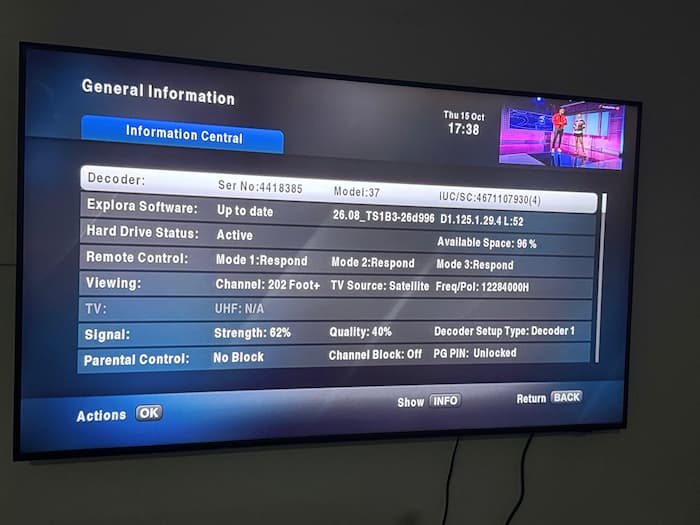
Menu names vary slightly between the HD single view decoder, the Explora and the Explora Ultra, but every model has a signal screen in the satellite settings area.
Write down both numbers before you change anything. Then check them again after every fix. Without a before and after reading, you cannot tell which change helped, and you can easily make things worse without noticing.
What Is a Good DStv Signal?
Aim for signal quality steadily above 60 percent, with strength in a similar range or higher. Quality matters more than strength. Below about 50 percent quality, expect freezing, pixelation and E48-32 errors, especially in rain.
Watch the bars for a minute rather than taking one glance. A reading that jumps up and down is a warning sign even when the average looks fine. A steady 65 percent beats a reading that swings between 40 and 90.
Your highest possible reading depends on your location and dish size. Do not chase 100 percent. Chase a quality reading that stays high and steady, because that is what keeps the picture clear when the weather turns.
Strength vs Quality: What the Two Bars Mean
Signal strength measures how much signal reaches the decoder. Signal quality measures how much of it is clean, usable DStv data. Strong signal with poor quality means the decoder is receiving the wrong thing or a noisy signal.
Think of strength as volume and quality as clarity. A radio can be loud and still full of static. Your decoder needs clarity to decode the picture.
Here is how to read the combinations:
- Both high and steady: your signal is fine. Any remaining problem is with the account or the decoder.
- Both low: not enough signal is arriving. Check cables, the LNB and dish alignment.
- Strength high, quality low or zero: the dish is pointed at the wrong satellite, the wrong satellite is selected in the settings, or the LNB is faulty.
- Both zero: nothing is reaching the decoder. Usually a disconnected or damaged cable, or a dead LNB.
How to Fix Low DStv Signal, Step by Step
Work from the quickest checks to the hardest. Restart the decoder, check every cable connection, inspect the cable and LNB for water damage, confirm the satellite settings, and only then adjust the dish. Most low signal problems are solved before you reach the dish.
1. Restart the decoder
Switch off at the wall, wait 60 seconds, and switch on again. Check the signal screen. This clears temporary glitches and takes one minute.
2. Tighten every connection
Check the cable at the back of the decoder, at any wall plate or splitter, and at the LNB on the dish. Connectors work loose over time, especially on dishes that move in the wind. Hand tight is enough. Do not crush them with pliers.
3. Inspect the cable and connectors
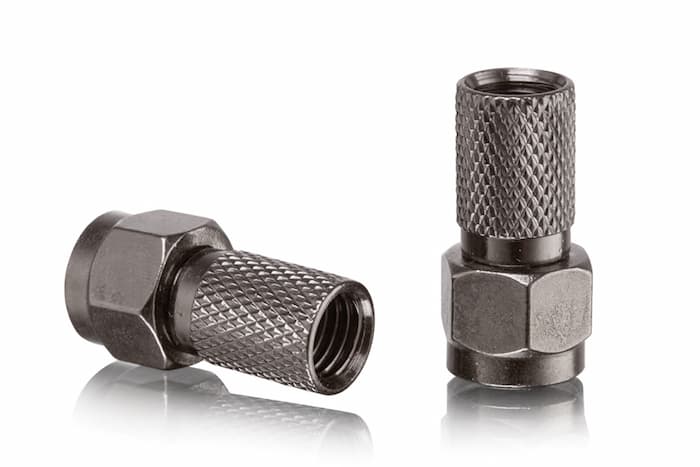
Follow the cable from the decoder to the dish. Look for cuts, sharp bends, sections crushed by doors or windows, and cable that has cracked in the sun. Unscrew the connector at the LNB. If it is green, rusty or wet inside, water has got in, and that alone can halve your signal.
Cut back to clean cable and fit a new F connector. Wrap the outdoor connection with self amalgamating tape so rain cannot get in again. Use RG6 satellite cable for any replacement, not thin TV aerial cable.
4. Remove splitters and long runs
Every splitter, joint and extra metre of cable loses some signal. To test, connect one good cable straight from the LNB to the decoder. If the signal jumps, your old cabling was the problem.
5. Check the satellite settings
If someone reset the decoder or ran the installation wizard, the wrong satellite may be selected. The next section covers this.
6. Suspect the LNB
The LNB is the small unit at the end of the dish arm. It ages in the sun and fails when water gets in. If the cabling is good and the dish has not moved but the signal is still low, the LNB is the likely cause. A new one costs far less than a technician’s callout. See our guide on how to fix an LNB on a satellite dish.
7. Check the dish alignment
If all of the above is fine, the dish has probably moved. Wind, a ladder, a workman, or a loose bracket can shift it slightly, and a few degrees is enough to lose the signal. The sections below show where it should point and how to realign it.
8. No signal on Tuner 1 or Tuner 2
Explora and other twin tuner decoders take a cable into each tuner. “No signal on Tuner 2” usually means the second cable is missing, loose or damaged, or the decoder is set up for two cables when only one is connected. Check both connections at the LNB and the decoder. Then run the installation wizard again and choose the correct number of cables. With a DStv smart LNB, one cable can feed both tuners, so that wizard setting matters even more.
DStv Signal Settings to Check
The most common settings mistake is the wrong satellite in the installation wizard. It causes the classic pattern of good strength and zero quality, because the decoder is listening for a satellite your dish is not pointed at.
Check the satellite, LNB type and LNB frequencies in your decoder’s installation settings. Our guide to fixing DStv not scanning lists the correct satellite for your country and walks through the installation wizard step by step.
Where to Point Your DStv Dish
In Nigeria, a DStv dish points east and slightly south, tilted up at roughly 51 to 56 degrees. In South Africa, it points northeast, tilted up at roughly 24 to 37 degrees. The exact direction depends on your city.
These are the approximate directions for major cities. Direction is a compass bearing from true north. Tilt is how far the dish faces up from the horizon.
Nigeria (36 degrees East satellite)
- Lagos: direction 100 degrees, tilt 51 degrees
- Ibadan: direction 102 degrees, tilt 52 degrees
- Benin City: direction 101 degrees, tilt 54 degrees
- Port Harcourt: direction 99 degrees, tilt 56 degrees
- Enugu: direction 102 degrees, tilt 56 degrees
- Abuja: direction 106 degrees, tilt 55 degrees
- Kaduna: direction 109 degrees, tilt 55 degrees
- Kano: direction 112 degrees, tilt 55 degrees
South Africa (IS20 satellite)
- Johannesburg: direction 63 degrees, tilt 36 degrees
- Pretoria: direction 63 degrees, tilt 36 degrees
- Durban: direction 57 degrees, tilt 37 degrees
- Bloemfontein: direction 62 degrees, tilt 33 degrees
- Gqeberha: direction 59 degrees, tilt 30 degrees
- Cape Town: direction 65 degrees, tilt 24 degrees
DStv dishes are offset dishes, so the dish face looks more upright than these tilt numbers suggest. Use the numbers to get close, then fine tune with the signal screen.
Finding the direction with your phone
The easiest way to find your satellite is a free satellite finder app. Search “satellite finder” in your app store, choose the satellite for your country, and the app shows its position on your camera view. Check there is nothing in the way, such as a tree, a wall or a new building.
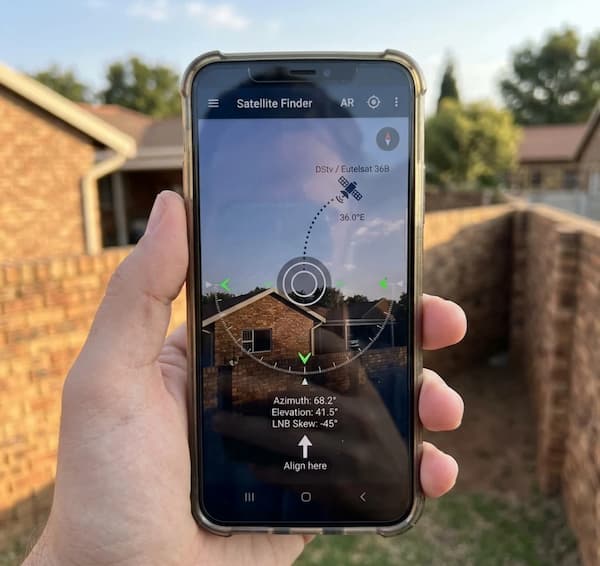
Be careful with a plain compass. A compass points to magnetic north, not true north, and the difference is large in South Africa, around 20 degrees or more. Satellite apps correct for this automatically, which is another reason to use one. In Nigeria the difference is small.
How to Realign the Dish Using the Signal Screen
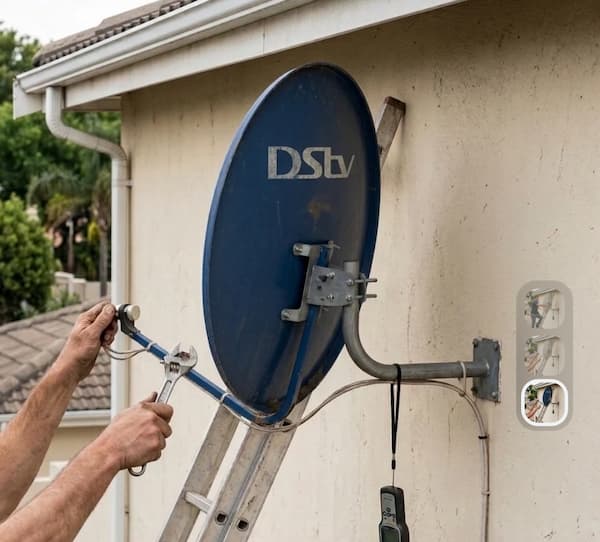
Loosen the dish bolts just enough to move it, then turn it very slowly left and right while someone watches the signal quality on the TV. Stop at the highest steady reading, then repeat for the tilt. Tighten the bolts carefully without shifting the dish.
Two people make this far easier. One moves the dish. The other watches the screen and calls out the numbers. A phone call between you works well if the TV is far from the dish.
- Mark the dish’s current position with a pen or tape before loosening anything, so you can return to it.
- Loosen the bolts that control left and right movement, just enough to turn the dish by hand.
- Move it a tiny amount at a time, about the width of a pen. Wait two or three seconds after each move, because the screen reading lags behind.
- Find the point where quality peaks. Go slightly past it each way to be sure, then return to the best spot.
- Tighten the left and right bolts, then repeat the same process for the up and down tilt.
- Finally, try rotating the LNB slightly in its holder. A small twist can add a few percent of quality.
- Tighten everything firmly and check the reading once more.
If the dish is on a high roof, do not work alone and do not work in wind or rain. A technician’s fee is always cheaper than a fall. For a more detailed walkthrough, see our guide on how to align a satellite dish without a meter.
Why the Signal Drops When It Rains
Heavy rain absorbs part of the satellite signal before it reaches your dish. This is called rain fade. It is normal and temporary, and the signal returns once the heavy rain passes. If your signal drops in light rain, your quality reading is too low and needs fixing.
A well aligned dish with good cabling has enough headroom to ride out most rain. If the picture fails at the first drizzle, treat that as a sign of a marginal setup: a slightly misaligned dish, water in a connector, or an ageing LNB.
Thick cloud alone rarely causes problems. Heavy downpours and storms do. If the signal does not return after the rain stops, check the cable connector at the dish for water and check that the wind has not moved the dish.
When Signal Is Fine but Channels Still Fail
If your quality is high and steady but some channels still show E48-32 or another error, the problem is no longer the dish. It can be a temporary transmission issue or an account error. Our guide on clearing the DStv E48-32 error covers what to do next.
Common Questions
What is a good signal strength for DStv?
Aim for signal quality steadily above 60 percent. Quality matters more than strength. Below about 50 percent, the picture is likely to freeze and fail in rain.
Why is my DStv signal strength 100 but quality 0?
The decoder is receiving a signal, but not DStv. The dish is pointed at the wrong satellite, the wrong satellite is selected in the settings, or the LNB is faulty.
Which direction should my DStv dish face?
In Nigeria, east and slightly south, around 100 to 112 degrees depending on your city. In South Africa, northeast, around 57 to 65 degrees. A satellite finder app on your phone shows the exact direction.
Can I find the DStv signal using my phone?
Yes. A free satellite finder app shows where the satellite sits in the sky through your camera. It gets you close. Fine tune the dish using the signal screen on your TV.
Why did my DStv signal suddenly drop?
Usually a loose or wet connector, a dish moved by wind, or a failing LNB. Check the connector at the dish first, because water damage is the most common cause after a storm.
Will a signal booster fix weak DStv signal?
Usually not. A booster amplifies noise as well as signal, so it rarely improves quality. Fix the alignment, cabling and LNB instead. Boosters only help on very long cable runs.
Does a bigger dish improve DStv signal?
It can, especially in areas near the edge of coverage or with frequent heavy rain. For most homes, a correctly aligned standard dish with good cable is enough.
The Short Version
Check the signal screen and write down both readings. Restart the decoder, tighten and inspect every connection, and remove splitters to test. Confirm the right satellite for your country. If the signal is still low, suspect the LNB, then realign the dish using the directions above and the quality reading on your TV.
Most weak signal problems are a loose or wet connector or a dish that has moved slightly. Once your quality reading is high and steady, your picture should survive everything except the heaviest storms. For account resets and error codes, use the official DStv self service portal.

Frenzy valentine is a passionate blogger, developer, and entrepreneur. He is the founder and author of myfreshgists.com.
I am having a problem here with my decorder…
It say “The channel number you selected is not in this viewing environmet” but it an E50-32