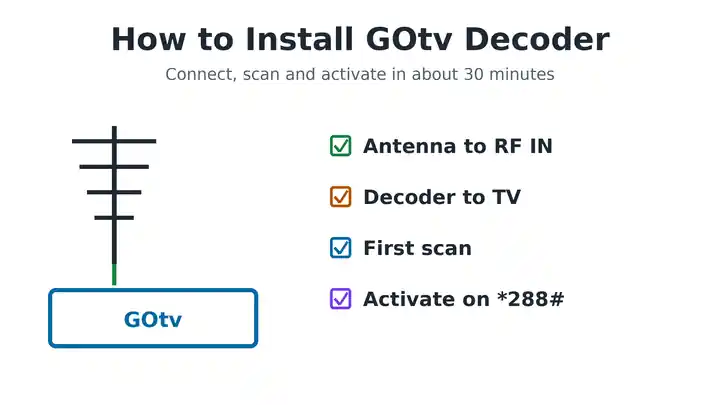
To install a GOtv decoder, connect the GOtenna cable to the RF IN port on the decoder, connect the decoder to your TV with an HDMI or AV cable, then plug in the power. Switch on, choose your language and let the decoder scan for channels. Finally, activate it with your IUC number on *288# or the MyGOtv app, and pay for a package. You do not need a technician, and the whole job takes about 30 minutes.
This guide shows each step with pictures, including where to put the antenna, which TV input to pick, how to activate a new decoder and what to do if the scan finds no channels.
What You Need to Install GOtv Decoder
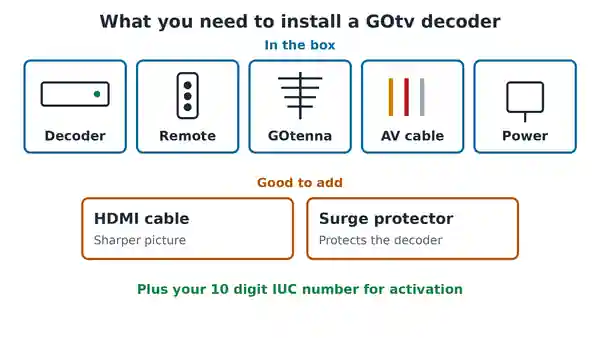
A GOtv kit usually comes with these items:
- Decoder: the GOtv box itself.
- Remote: the GOtv remote control and batteries.
- GOtenna: the small outdoor antenna, with its cable and mounting parts.
- AV cable: the audio and video cable for connecting to the TV.
- Power supply: the adapter that powers the decoder.
You may also want an HDMI cable, because it gives a sharper picture on newer TVs and is not always in the box. A surge protector is worth buying too, since a power surge can damage the decoder.
Prices change with promotions. When we last checked, the official GOtv Nigeria website listed a decoder and GOtenna bundle for ₦9,000. Buy from an authorised dealer, so the decoder is genuine and can be activated.
Where to Put the GOtv Decoder and Antenna
Pick the spots before you connect anything, because moving them later means undoing the cables.
- Decoder: near the TV and a power socket, with space around it for air. Do not shut it inside a closed cabinet, because heat can make it fail early.
- GOtenna: outside, as high as you can safely mount it, with a clear view towards the nearest GOtv transmitter. Walls, tall buildings, trees and water tanks weaken the signal.
GOtv’s own installation guide suggests mounting the antenna outside temporarily first. Then you can move it until the signal is strong, before you fix it in place.
How to Install GOtv Decoder Step by Step
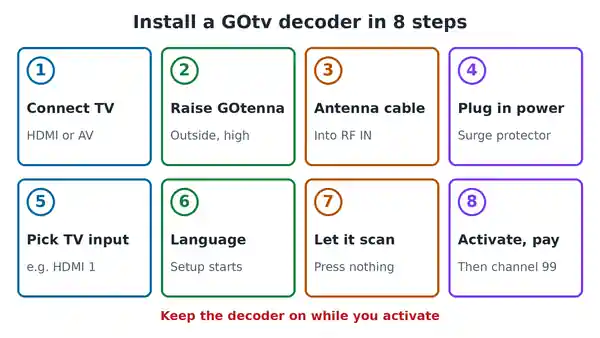
- Connect the decoder to the TV. Use the HDMI cable, or the AV cable on an older TV.
- Put up the GOtenna. Mount it outside for now, pointing towards the transmitter.
- Connect the antenna to the decoder. Screw the antenna cable into the RF IN port on the back of the decoder.
- Connect the power. Plug the power supply into the decoder, then into a surge protector or wall socket.
- Switch on the TV, then the decoder. Choose the TV input you used, such as HDMI 1.
- Choose your language. Setup starts on its own the first time you switch on.
- Let it scan. Wait while the decoder searches for channels. Do not press any buttons until it finishes.
- Activate and pay. Activate the decoder with your IUC number, pay for a package, then tune to channel 99.
The sections below explain the steps that cause the most trouble.
How to Connect GOtv Antenna to Decoder
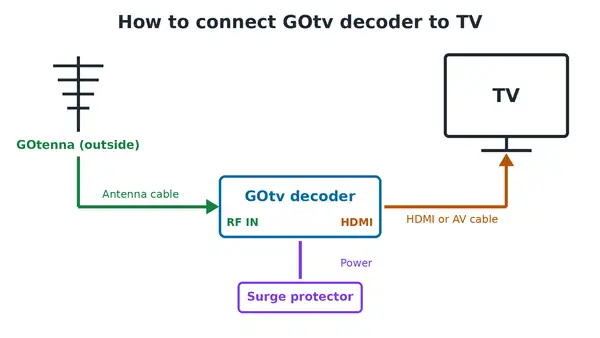
Take the cable from the GOtenna and screw it into the port marked RF IN on the back of the decoder. Turn it clockwise until it is finger tight. Do not use pliers, because the thread is fine and strips easily.
Leave the RF OUT port empty. It is only used when you send the signal on to a second TV.
Before you connect the cable, look at the thin copper pin in the middle of the connector. It should stick out far enough to reach inside the port. If it looks short, strip back a little more of the outer cable sleeve so more pin shows.
The GOtenna has arrows and markings that show which way up it goes. For a full guide to assembling, mounting and aiming it, see our post on how to fix a GOtv antenna. If you want to use a normal TV aerial instead of the GOtenna, our guide on connecting GOtv to an external antenna explains how.
How to Connect GOtv Decoder to TV
Using an HDMI cable
HDMI carries picture and sound in one cable and gives the best picture. Plug one end into the HDMI port on the decoder and the other end into any HDMI port on the TV. Note the port number on the TV, such as HDMI 1 or HDMI 2.
Using the AV cable on an older TV
If your TV has no HDMI port, use the AV cable. Match the colours exactly. Yellow carries the picture, while red and white carry the sound. If you mix them up, you may get a picture with no sound, or sound with no picture.
Choose the right TV input
Press Input or Source on the TV remote and pick the port you used. This is the step people skip most often, and it leaves a blank screen that looks like a dead decoder. When the input is right, the GOtv screen appears within about 20 seconds.
To use one decoder on two TVs, see our guide on how to connect two TVs to one GOtv decoder.
First Time Installation and Channel Scan
The first time you switch on a new decoder, it opens the First Time Installation screen. Choose these settings:
- Language: English or your preferred language.
- Country: the country where the decoder is.
- Antenna Power: leave it OFF. The standard GOtenna does not need power. Only switch it on if you bought a separate powered antenna.
The decoder then scans for channels by itself. Let it finish without pressing anything. An interrupted scan leaves the channel list incomplete.
How to rescan GOtv channels
If you need to scan again later, press Menu on the GOtv remote, open Advanced Options, then Installation, then Tuning, and choose Automatic Scan. Do not use Manual Scan. It asks for a transmitter frequency, which subscribers do not need.
Check the GOtv signal strength
Press Menu, open Advanced Options and choose Signal Information. GOtv’s installer manual treats 75 to 100 percent as a good signal. Below that, move the antenna higher or turn it slowly, wait a few seconds after each move, then check again. Rescan only when the signal is strong. If the decoder keeps scanning or asks for a frequency, our guide to a GOtv decoder stuck on scanning has every fix.
Find Your GOtv IUC Number
You need your IUC number to activate the decoder. It is a 10 digit number printed on a sticker under or behind the decoder. If the sticker is hard to read, press the Help button on the GOtv remote and the number appears on screen. Write it down or take a photo of it, because you will need it for every payment and every call to GOtv. Our guide to the GOtv IUC number explains everything it is used for.
How to Activate a New GOtv Decoder
A new decoder shows locked channels until GOtv activates the account linked to it. Keep the decoder switched on the whole time, because the activation signal is sent over the air and cannot reach a decoder that is off.
Activate GOtv with *288#
- Dial *288# from your phone.
- Choose GOtv, then the option to activate a new decoder or new account.
- Enter your IUC number, surname, city and phone number when asked.
- Confirm and submit, then wait for the confirmation message.
Activate on the MyGOtv app
- Download the MyGOtv app from the Google Play Store or Apple App Store.
- Choose the option to activate a new account.
- Enter your city, surname, phone number and IUC number. Add the Agent ID from your dealer if you have one.
- Submit and wait for the confirmation.
If activation does not come through after a few minutes, contact GOtv Nigeria on +234 803 900 3788 or on WhatsApp at +234 908 236 8533. Have your IUC number ready.
Pay for Your First GOtv Package
Activation opens the account, and a paid package opens the channels. From 5 November 2026, GOtv Nigeria lists four packages: GOtv Easy at ₦4,000, Starter at ₦6,000, Select at ₦11,000 and Sports at ₦21,000 a month. See our full guide to GOtv packages and prices to compare the channels in each.
You can pay on the MyGOtv app, on *288#, through your bank app or at an agent. Leave the decoder on while you pay, then tune to channel 99 and wait a few minutes for the channels to open.
Problems After You Install GOtv Decoder
- Blank screen with no GOtv logo: the TV is on the wrong input. Press Input or Source and try each option.
- Picture but no sound: the AV colours are mixed up. Match yellow, red and white again.
- Decoder will not switch on: test the socket with another device, then check the power supply.
- Scan finds no channels: check the RF IN cable and the copper pin, then move the antenna higher.
- Error code such as E16: the account is not active or not paid yet. See our guide to GOtv error codes.
- Remote does nothing: change the batteries and point it straight at the decoder.
If the light on the front of the decoder stays red, our guide on what each GOtv decoder light means will help.
Common Questions
Can I install a GOtv decoder myself?
Yes. GOtv publishes a self install guide, and most homes can do it in about 30 minutes with the parts in the box. Call an installer only if you need the antenna mounted somewhere high or unsafe.
Does GOtv need a satellite dish?
No. GOtv uses a small antenna that picks up a signal from a nearby transmitter, not a dish. That is why it only works in areas with GOtv coverage.
How long does GOtv activation take?
Usually a few minutes after you submit your details, as long as the decoder is switched on. If it takes much longer, contact GOtv with your IUC number.
Can I install GOtv decoder without the GOtenna?
Yes, if you have a working outdoor UHF TV aerial. GOtv uses a terrestrial signal, so a normal aerial can pick it up. Connect it to RF IN in the same way.
Why does my GOtv show no signal after installation?
The antenna is usually too low, pointed the wrong way, or blocked. Check the cable first, then raise or turn the antenna while you watch the signal strength.
Install GOtv Decoder the Right Way
To install a GOtv decoder, connect the GOtenna to RF IN, connect the decoder to your TV, plug in the power and let the first scan finish. Then activate it with your IUC number and pay for a package with the decoder switched on. Most problems come from the wrong TV input, a loose antenna cable or a weak signal, so check those first. For coverage, dealers and official self service, visit the official GOtv Nigeria website.

Frenzy valentine is a passionate blogger, developer, and entrepreneur. He is the founder and author of myfreshgists.com.
1 thought on “How to Install GOtv Decoder Yourself: Step by Step (2026)”