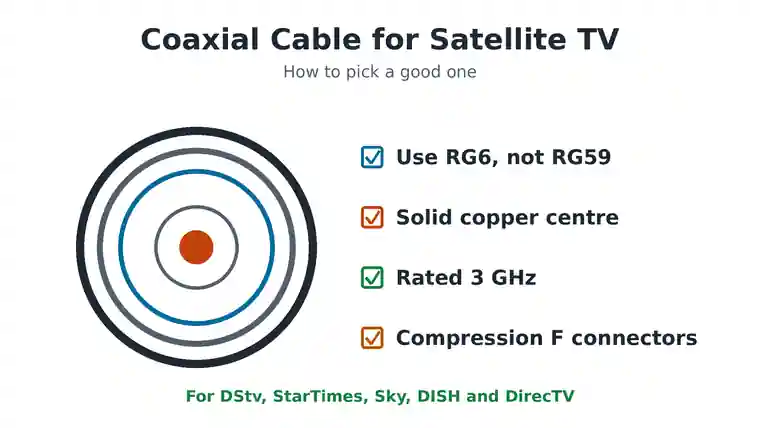
The best coaxial cable for satellite TV is RG6 with a solid copper centre wire, rated for at least 2,150 MHz, and ideally marked 3 GHz. Pair it with good compression F connectors and keep the run as short as you can. RG59, the thinner cable often sold cheaply, loses too much signal for most satellite dishes.
This guide explains what to look for when you buy coaxial cable for satellite TV, how to spot fake or low quality cable, and how to fit it so it lasts. It works for DStv, StarTimes and free to air in Africa, Sky in the UK, and DISH or DirecTV in the US.
What Is Coaxial Cable and Why Does Quality Matter?
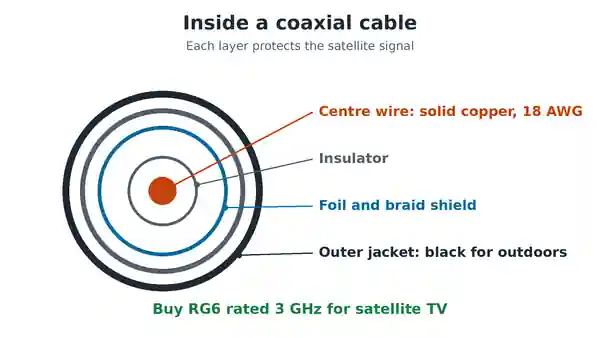
Coaxial cable, or coax, carries the signal from your dish down to the decoder. It has four layers. In the middle is a centre wire. Around it is a white or clear insulator, then a metal shield of foil and braid, and finally an outer plastic jacket. The shield keeps outside interference out and the signal in.
For satellite TV, the cable has two jobs. It brings the signal down from the LNB, the unit on the dish arm. It also carries power up to the LNB from your decoder. A poor cable loses signal on the way down and voltage on the way up. That is why a cheap cable can cause no signal errors, picture breakups or channels that drop in the rain.
RG6 vs RG59: Which Coaxial Cable for Satellite TV?
The “RG” number tells you the cable type. These are the three you will see most often:
| Cable | Thickness | Best use |
|---|---|---|
| RG59 | Thin, about 6 mm | Short CCTV or old analogue TV links. Not good for satellite. |
| RG6 | Medium, about 7 mm | Almost all home satellite and cable TV. The standard choice. |
| RG11 | Thick, about 10 mm | Very long runs, such as from a dish on a far building. |
Satellite signals travel down the cable at high frequencies, between about 950 and 2,150 MHz. Thin RG59 loses much more signal at those frequencies than RG6. It also has a smaller centre wire, so it drops more of the LNB voltage. Use RG6 for every satellite run, and RG11 only if the cable is very long.
What to Look For When You Buy Coaxial Cable
1. A solid copper centre wire
RG6 for satellite should have an 18 AWG solid centre wire. You will see two kinds. Solid copper is best, because it carries the LNB power with the least loss. Copper clad steel, marked CCS, is steel with a thin copper coat. It is cheaper and fine for short runs, but over long distances or with multi-tuner systems like DirecTV SWM, solid copper is the safer choice.
2. A 3 GHz or 2,150 MHz rating
Look on the jacket or the box for “3 GHz”, “2150 MHz” or “satellite rated”. Cable sweep tested to 3 GHz works with every common satellite system. Cable rated only to 1 GHz is meant for antenna or old cable TV, and may lose the top channels.
3. Good shielding
Standard RG6 has two shield layers, a foil and a braid. Quad shield cable has two more. Quad shield helps in homes with lots of interference, such as near mobile masts or busy wiring, but dual shield is enough for most homes. Check the braid coverage too. A braid of 60 percent or more is normal for good cable.
4. A tough outer jacket for outdoor runs
The part of the cable outside faces sun and rain every day. Black jackets resist sunlight better than white ones. For cable buried in the ground, buy flooded or direct burial cable, which has a gel that blocks water.
How to Spot Fake or Low Quality Coaxial Cable
In many markets, including Nigeria, cheap cable is often sold as “RG6” when it is not. Before you pay, try these quick checks on a cut end:
- The scratch test: scrape the centre wire with a knife. Solid copper stays copper coloured. Copper clad steel shows silver underneath. A wire that is silver all through is often aluminium, which is poor for satellite.
- The magnet test: a magnet sticks to copper clad steel, but not to solid copper.
- Look at the braid: if you can see lots of white insulator through a thin, loose braid, the shielding is weak.
- Read the jacket: good cable is printed with its type, such as RG6, plus a frequency rating and the maker’s name. Blank cable is a warning sign.
- Feel the thickness: real RG6 is noticeably thicker than RG59. If it feels thin and soft, it is probably RG59.
Paying a little more for known brand cable saves you a callout later. A weak cable can look exactly like a faulty LNB or dish, so many people replace the wrong part first.
Coaxial Cable Connectors for Satellite TV
Even the best cable fails with a bad connector. Satellite TV uses F connectors, the small screw on plugs. There are three common types:
- Compression connectors: fitted with a special tool. They seal well against water and give the most reliable signal. This is what professional installers use.
- Crimp connectors: squeezed onto the cable with pliers. They work, but they can loosen or let water in over time.
- Twist on connectors: screwed onto the cable by hand. They are quick but the weakest choice, so use them only for temporary indoor links.
When you fit any connector, fold the braid back neatly and make sure no strand touches the centre wire. A single stray strand can short the LNB power and kill the signal. Our guide to choosing the right RF connector covers connectors for antennas too.
How to Install Coaxial Cable for Satellite TV
- Plan the shortest route. Every extra metre loses a little signal. Avoid coiling spare cable in a big loop.
- Avoid sharp bends. Bend the cable gently. A tight kink damages the insulator inside.
- Do not crush it. Cable trapped in a window or door, or stapled too hard, loses signal at that point.
- Make a drip loop. Where the cable enters the wall, let it dip down first, so rain runs off instead of into the hole.
- Seal outdoor connectors. Wrap them with self amalgamating tape or fit rubber boots. Water in a connector is a common cause of signal loss in the rainy season.
- Keep it away from mains cables. Running coax right beside power cables can add interference.
Using splitters with satellite TV
A normal TV splitter does not work for satellite. It is built for lower antenna frequencies and blocks the LNB power. For two decoders, use a twin LNB with a separate cable to each decoder, or a splitter that is clearly marked for satellite, usually 5 to 2,400 MHz with power passing on at least one port. Our guide to connecting a DStv decoder to multiple TVs explains the options.
Cable for DStv, DISH and DirecTV
DStv and StarTimes dishes work well with standard satellite rated RG6. A DStv Explora with a Smart LNB sends several tuners down one cable, so a good solid copper cable matters more there. DISH and DirecTV installers in the US use RG6 rated to 3 GHz, and DirecTV SWM systems also carry power through a power inserter, which is another reason to choose solid copper.
Signs Your Satellite Coaxial Cable Needs Replacing
- Green or white rust on the connectors.
- Cracks or splits in the outer jacket.
- Signal that drops when it rains and comes back when it dries.
- Signal that changes when you move or touch the cable.
- Joints wrapped in ordinary tape, or cable that has been chewed by rats.
To test it properly, measure the voltage at the dish end with a multimeter while the decoder is on. Our guide on using a multimeter on an antenna shows how. If the cable is fine, the fault may be the LNB, so read how to fix LNB on a satellite dish. For a full checklist, see what to do when your satellite dish says no signal.
Common Questions
Can I use any coaxial cable for satellite TV?
No. Use RG6 rated for satellite frequencies. Thin RG59 and cheap cable rated only to 1 GHz often give a weak or no signal.
Is quad shield cable better?
It blocks more interference, but it is thicker and harder to fit. For most homes, good dual shield RG6 is enough.
How long can a satellite coaxial cable be?
Shorter is always better. Many home runs are under 30 metres. If you need much longer, use good solid copper RG6 or RG11, and check the signal screen after installing.
Do I need a new cable when I change decoder?
Not usually. A good cable in good condition works with a new decoder. Replace it only if it is damaged, corroded or the wrong type.
Choosing Coaxial Cable for Satellite TV the Right Way
For satellite TV, buy RG6 with a solid copper centre wire and a 3 GHz rating, check it is real with the scratch and magnet tests, and fit compression F connectors sealed against rain. Keep the run short and use only satellite rated splitters. For the technical details of the cable standard, see the RG-6 cable overview.

Frenzy valentine is a passionate blogger, developer, and entrepreneur. He is the founder and author of myfreshgists.com.