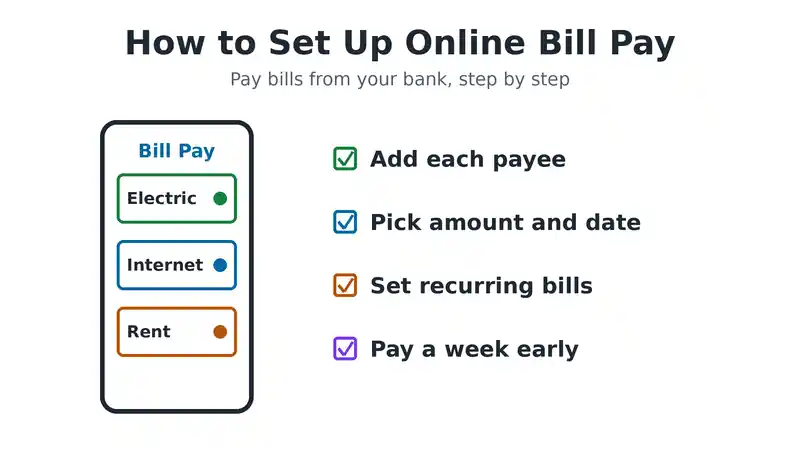
To set up online bill pay, sign in to your bank’s website or app and open the Bill Pay section. Add the company you want to pay as a payee, using the account number on your bill. Then enter the amount and the date, and the bank sends the payment for you. Most banks offer this for free. You can pay once, schedule a future payment, or set up a repeating payment for bills like rent, internet and electricity.
This guide explains how online bill pay works, gives step by step instructions for your bank and for paying a company directly, and covers the timing rules that help you avoid late fees.
What Is Online Bill Pay?
Online bill pay is a service that lets you pay bills from your bank account over the internet, instead of writing and mailing checks. There are two main ways to do it:
- Bank bill pay: you pay all your bills from one place, your bank’s website or app. The bank sends each payment for you.
- Paying the company directly: you log in to each company’s website, such as your phone or electric company, and pay there with your bank account or card. This is often called autopay when it repeats every month.
Bank bill pay keeps everything in one place. Paying the company directly is often faster, and some companies give a small discount when you sign up for autopay.
How Does Online Bill Pay Work?
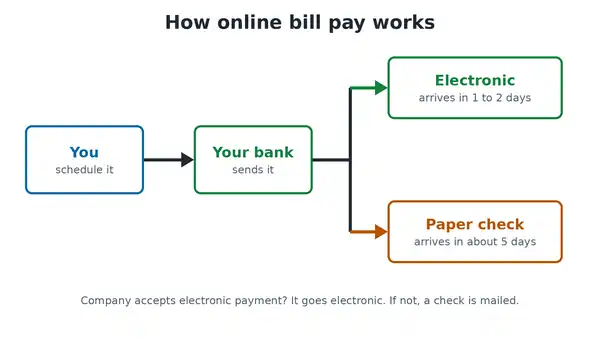
When you schedule a payment, your bank checks whether the company can accept electronic payments.
- If it can, the bank sends the money electronically. Chase, for example, says electronic payments arrive in 1 or 2 days.
- If it cannot, the bank prints a paper check and mails it for you. Chase says paper checks arrive in about 5 days.
The timing also affects when money leaves your account. With an electronic payment, the money usually leaves on the day the payment is sent. With a paper check, it often leaves when the company cashes the check. That is why it helps to keep enough money in your account until the payment clears.
How to Set Up Online Bill Pay With Your Bank
The exact menu names differ from bank to bank, but the steps are almost the same everywhere.
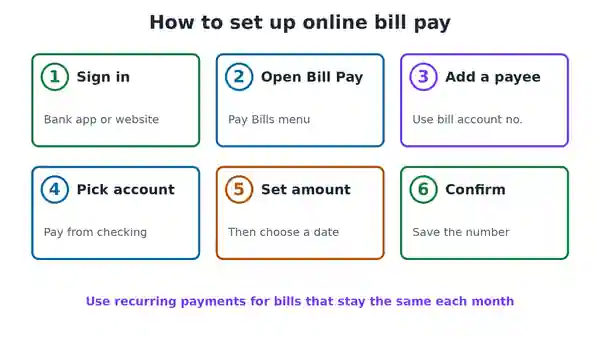
- Sign in to online banking. Use your bank’s website or mobile app. If you have not used online banking before, enrol first with your account details.
- Open Bill Pay. Look for a menu called Bill Pay, Pay Bills or Pay and Transfer. Some banks ask you to accept the bill pay terms the first time.
- Add a payee. Choose Add a Payee and search for the company by name. Enter your account number from the bill, and the billing address if asked. Check every number carefully, because a typo can send money to the wrong account.
- Choose the account to pay from. Pick the checking account that the money should come out of.
- Enter the amount and date. Type the amount, then choose a send date or a deliver by date. Leave enough time for the payment to arrive before the due date.
- Review and confirm. Check the payee, amount and date, then submit. Save the confirmation number.
How to set up a repeating payment
For bills that are the same every month, such as rent or a car loan, set up a recurring payment.
- Add the payee first, using the steps above.
- Choose the option for automatic, recurring or repeating payments.
- Pick how often to pay, such as monthly, and the start date.
- Choose when the payments should stop, such as after a set number of payments or never.
- Confirm, then check the first payment goes through correctly.
How to use eBills
Many banks offer eBills, which are electronic copies of your bills sent straight to your online banking. Once you sign up for a payee’s eBills, you can see the amount due and the due date inside bill pay, and pay with a few taps. This is handy for bills that change every month, such as electricity or a credit card.
How to Set Up Bill Pay With a Company
You can also pay a company directly on its own website or app.
- Create an online account on the company’s website, using the account number from your bill.
- Go to the billing or payments section.
- Add a payment method. This is usually your bank account, with the routing and account numbers, or a debit or credit card.
- Choose a one time payment or autopay. Autopay takes the amount due each month on or near the due date.
- Turn on email or text reminders, so you know when each payment is coming.
For example, our guides show how to pay a DIRECTV bill and how to pay an AT&T phone bill online.
Types of Scheduled Payments
- One time payment: you pay a single bill once, such as a repair or a deposit.
- Future dated payment: you schedule a payment now for a later date, such as just before payday.
- Recurring payment: the same amount goes out on a schedule, such as rent every month.
- Autopay from the company: the company takes whatever amount is due each month. This suits bills that change, but check each bill so you are not surprised.
How Long Does Online Bill Pay Take?
Timing depends on your bank and on how the payment is sent. As a guide:
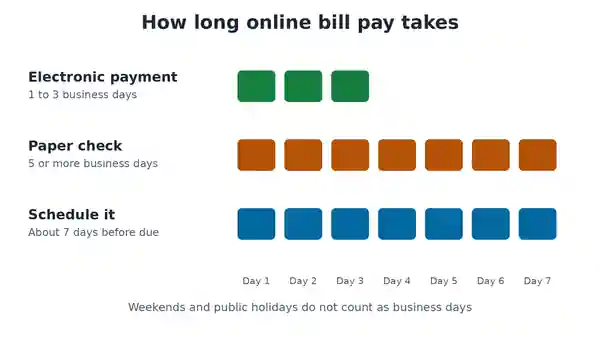
- Electronic payments usually arrive in 1 to 3 business days.
- Paper checks can take 5 business days or more. One bank, Great Southern Bank, asks customers to schedule check payments at least 10 business days before the due date.
- Weekends and public holidays do not count as business days.
To be safe, schedule each payment at least a week before the due date, or use the deliver by date if your bank offers it.
How Does Online Bill Pay Work When Paying an Individual?
Many banks let you add a person as a payee, such as a landlord, babysitter or gardener. You enter their name and mailing address. Because most individuals cannot receive electronic bill payments, the bank usually mails them a paper check. Some banks set limits on payments to individuals. Great Southern Bank, for example, caps them at $1,700 per payment.
If you want the person to get the money faster, a person to person service from your bank is often quicker. Only send money this way to people you know and trust.
Can You Cancel an Online Bill Payment?
Usually yes, as long as the payment has not been processed. Open bill pay, find the payment in your scheduled or pending list, and choose Cancel or Edit. Banks set a cut off time, often the business day before the payment goes out. Once an electronic payment has been sent, you usually cannot stop it, so contact the company directly if you made a mistake.
Is Online Bill Pay Safe?
Online bill pay through your own bank is generally safe, because your account details stay with your bank. Follow these habits to keep it that way:
- Use a strong, unique password and turn on two step verification.
- Only add payees from bills you have received, not from emails or texts asking you to pay.
- Check payee account numbers before you save them.
- Review your account activity every week and report anything you do not recognise.
- Avoid signing in to your bank on public WiFi.
Benefits and Downsides
Benefits: no stamps or checks, all bills in one place, payment history saved for your records, and fewer late fees. Some banks, including Chase, promise to cover late fees if a delay is their fault and you followed their rules.
Downsides: a payment can fail or cause an overdraft if your balance is too low. Mailed checks take longer. And if you set up autopay and forget about it, you may keep paying for a service you no longer use.
Paying Electricity and Cable TV in Nigeria
Readers in Nigeria use the same idea, but through different tools. Most bank apps and bank USSD codes let you pay electricity, cable TV and airtime directly. Payment services such as Quickteller also handle many local bills. Our guide on how to pay DStv online in Nigeria walks through one common example.
Common Questions
Is online bill pay free?
At most banks, yes. Chase, for example, says there is no extra cost to use its Online Bill Pay. Check your bank’s fee schedule to be sure.
What do I need to set up bill pay?
You need online banking access, the company’s name and address, and your account number from the bill.
What is the difference between bill pay and autopay?
Bill pay is run by your bank, and you control when each payment goes out. Autopay is usually set up with the company, which takes the amount due each month.
Why did my bill pay payment arrive late?
It may have been sent as a paper check, or scheduled too close to the due date. Schedule earlier, and check that the payee details match your bill.
Set Up Online Bill Pay Today
To set up online bill pay, sign in to your bank, add each company as a payee, choose an amount and date, and confirm. Use recurring payments for fixed bills, eBills or autopay for bills that change, and schedule each payment about a week early. If your bills are too high, see our tips on how to lower your cable TV and internet bill. For one bank’s full guide, see Chase Online Bill Pay.

Frenzy valentine is a passionate blogger, developer, and entrepreneur. He is the founder and author of myfreshgists.com.