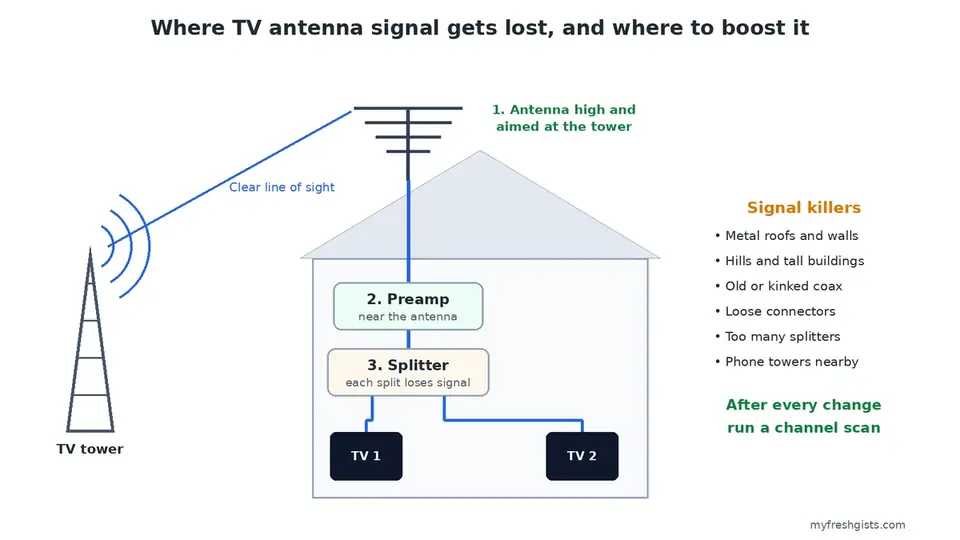
To boost TV antenna signal, start with the free fixes: aim the antenna at your local towers, raise it higher and rescan for channels. Only then think about an amplifier. In most homes, placement and cabling matter far more than any gadget.
These steps work for free over the air TV in the US, a TV aerial in the UK, and terrestrial pay TV such as GOtv or StarTimes antennas in Africa. The physics is the same everywhere.
Why Your TV Antenna Signal Is Weak
A weak antenna signal usually comes from distance, things blocking the path to the tower, poor cable, or too many splits. Find which one applies before you spend money.
- Distance: the farther the tower, the weaker the signal.
- Obstacles: hills, tall buildings, trees and metal roofs all block signal.
- Cable: old, thin or damaged coaxial cable leaks signal on the way to the TV.
- Splitters: every split shares the signal, so each TV gets less.
- Interference: nearby phone masts and some electronics add noise.
1. Find Where Your Towers Are
You cannot aim well without knowing the target. In the US, enter your address on the FCC’s DTV Reception Maps. It shows each station, its direction and how strong the signal should be. In the UK, Freeview’s coverage checker does the same. Elsewhere, ask your provider which transmitter serves your area, or see our guide on finding TV tower locations.
Also note whether your stations use VHF or UHF. Some antennas sold as HD antennas pick up UHF well but VHF poorly. So check the box before you buy.
2. Aim the Antenna Slowly
Point the antenna toward the towers you found. Then turn it a little at a time. Wait a few seconds after each move, because the TV needs time to lock on.
Use the signal meter in your TV or decoder menu while you adjust. On many TVs it sits under Settings, then Channels or Signal. On a GOtv decoder, the signal bars show on the info screen. Stop where both strength and quality are highest, not just strength.
3. Raise the Antenna Higher
Height is the cheapest way to boost TV antenna signal. Each step up clears more roofs, trees and hills between you and the tower.
An outdoor antenna on the roof or a pole usually beats one in the attic. An attic antenna, in turn, beats one inside the room. For an indoor antenna, try a high spot on a window that faces the towers.
4. Move Away From Interference
Keep indoor antennas away from Wi Fi routers, LED lamps, microwaves and phone chargers. These can add noise that weakens the picture.
Phone networks can also cause trouble. In the US, 5G on the 600 MHz band sits right next to TV channels. If signal drops near a mast, a cheap LTE or 5G filter on the antenna cable can help.
5. Check Every Cable and Connector
Now follow the cable from the antenna to the TV. Look for cuts, kinks, crushed sections and rust on the connectors. Any damage lets signal leak out before it reaches the TV.
Then tighten every connector by hand. Loose fittings are one of the most common causes of a picture that comes and goes. Replace old RG59 cable with RG6, which loses less signal on long runs. Our guide to buying good coaxial cable explains what to look for.
6. Remove Splitters You Do Not Need
Each splitter divides the signal. A two way splitter roughly halves what reaches each TV, and every extra split cuts it further.
So remove any splitter that feeds an unused room. If you must feed several TVs, a distribution amplifier keeps the level up for each one.
7. Add an Amplifier, but Only the Right One
An amplifier cannot create signal that is not there. It only makes up for losses from long cables and splitters.
- Preamplifier: fits on the mast, close to the antenna. Use it for long cable runs or weak, distant towers.
- Distribution amplifier: fits indoors, before the splitter. Use it when one antenna feeds several TVs.
However, too much gain can overload the tuner, especially near a strong tower. If the picture gets worse with an amplifier, take it out. Before you buy one, read our tips on choosing a TV antenna signal booster.
8. Rescan for Channels
After every change, run a full channel scan. Otherwise, the TV keeps its old list and never finds the stronger signal.
Rescan once a year as well. Stations sometimes change frequency, and your channels can quietly disappear.
9. Upgrade the Antenna
If the towers are far away or behind a hill, a small flat indoor antenna may never be enough. Instead, choose an outdoor antenna rated for your distance and for both VHF and UHF. A directional antenna works best when all your towers sit in one direction.
10. Test the Signal Properly
A multimeter can check a cable for breaks, but it cannot measure TV signal. For real numbers, use the meter built into your TV or decoder, or a proper signal meter. Our guide on testing antenna cable with a multimeter shows what it can and cannot tell you.
Boost TV Antenna Signal on GOtv and StarTimes
GOtv and StarTimes antenna services use the same over the air signal, so every step above applies. Aim at your nearest transmitter, mount the antenna high, and check the cable. Then check the signal bars on the decoder. For GOtv in particular, our guide to fixing a GOtv antenna walks through the decoder screens.
Common Questions
Does foil or a metal hanger boost TV antenna signal?
Rarely, and never for long. Aiming the antenna and raising it does far more.
Does weather affect antenna signal?
Heavy rain, wind and storms can cause brief dropouts, especially on weak channels. If signal drops in all weather, the cause is elsewhere.
How far can a TV antenna reach?
It depends on terrain, tower power and height. Hills often matter more than miles. So use a reception map rather than the range printed on the box.
Boost TV Antenna Signal With the Free Fixes First
To boost TV antenna signal, aim the antenna at the towers, raise it, fix the cables and rescan. Most weak signals improve with those steps alone. Add an amplifier only to cover long cables or many TVs. To check what reaches your address in the US, use the FCC DTV Reception Maps.

Frenzy valentine is a passionate blogger, developer, and entrepreneur. He is the founder and author of myfreshgists.com.