
Last updated: April 2026
If your DStv Explorer or Explora decoder in Nigeria suddenly shows a distorted picture, no sound, unresponsive remote, no signal error, or the hard drive corrupt message, you are not alone. These DStv Explorer decoder problems remain some of the most common complaints among Nigerian subscribers in 2026.
The good news is that over 90% of these issues can be fixed at home in less than 15 minutes without calling a technician. This complete 2026 guide covers every major DStv Explora decoder problem with up-to-date step-by-step instructions, the latest self-service methods, and proven fixes that work right now with current firmware.
Whether you have the classic HD PVR Explorer or the newer Explora model with Smart LNB, this guide will help you get your decoder working perfectly again.
Why DStv Explorer Decoder Problems Happen
Most DStv decoder issues in Nigeria are caused by temporary signal glitches from weather, loose cables, or dish misalignment. Other common causes include outdated firmware, subscription validation delays after payment, overheating, or power fluctuations.
Understanding the cause makes fixing it much faster. Let’s go through every common problem one by one.
Common DStv Explora Decoder Issues in 2026
- Distorted or fuzzy picture on some or all channels
- Audio completely missing or out of sync with the picture
- Remote control not responding or not pairing
- No signal or E48-32 error message
- Hard drive corrupt or recording failure
- Decoder stuck on loading screen or reboot loop
1. Fix Distorted or Fuzzy Picture on DStv Explorer Decoder
A distorted picture is usually the first sign of a weak or unstable signal. This problem is extremely common in Nigeria due to weather changes or cable connections.
Follow these steps to fix it quickly:
- Perform a full power cycle reboot (detailed below).
- Inspect every cable from the Smart LNB to the decoder and tighten all F-connectors.
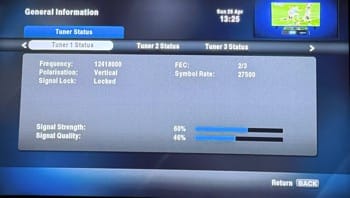
- Press Menu → Settings → Satellite Settings → check that signal strength is above 70% and signal quality is above 60%.
- If the picture is still bad, go to Menu → Settings → Audio & Video Settings → Reset Video Settings.
This simple process resolves distorted picture for most users in Nigeria.
2. Fix DStv Audio Not Synchronized or Missing Completely
Audio sync issues are very common on high-speed fibre connections in 2026. Many users report the sound being out of sync or completely missing.
Quick fixes that work instantly:
- Press the Pause button on your remote for 8–10 seconds, then press Play. The audio usually snaps back into sync.
- Unplug and replug the HDMI cable or try a different HDMI port on your TV.
- Go to Menu → Settings → Audio Settings → Digital Audio Output → choose “Auto” or “PCM Stereo”.
If audio is completely missing, confirm your TV is not on mute and the volume is turned up on both devices.
3. Fix DStv Explora Remote Not Working in Nigeria 2026
The DStv Explora remote not working is one of the most frustrating and frequently reported issues.
Updated 2026 pairing method:
- Point the remote directly at the decoder from less than 1 metre away.
- Press and hold the ARC button + INFO button together until the remote light flashes.
- Type the code 994 on the remote.
- If it still doesn’t respond, try the factory reset method: Press and hold ARC + STANDBY, then enter code 977.
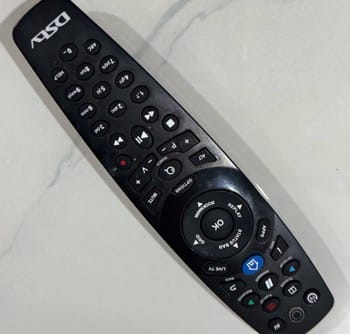
Replace the batteries if the remote light is dim or blinking slowly.
For even more detailed remote troubleshooting steps, read our complete guide: How to Fix DStv Remote Not Working in Nigeria 2026
4. The Best Way to Reboot Your DStv Explora / Explorer Decoder in 2026
A proper reboot fixes more than 70% of random glitches.
Most effective method (power cycle):
- Unplug the power cord from the wall socket (not just the back of the decoder).
- Wait a full 60 seconds.
- Plug it back in and leave the decoder alone for 3–5 minutes while it fully boots.
Alternative menu method: Menu → Settings → System Settings → Reboot.
Front panel method: Press and hold the power/standby button on the front of the decoder for 10–15 seconds.
5. Clear Error Codes and Refresh Your DStv Subscription (2026)
The fastest and most reliable way in 2026 is through the official self-service portal.
Step-by-step:
- Open your browser and go to the DStv Nigeria Self-Service portal.
- Log in using your smartcard number and account details.
- Select “Clear Error Codes” or “Refresh Subscription”.
- Follow the on-screen instructions and leave your decoder switched on for at least 15–30 minutes.
This method works for E16, E19, E30, E32, E48 and many other common codes.
Official link: DStv Nigeria Self-Service Portal
6. DStv Explora Hard Drive Corrupt or Recording Problems
Older Explora PVR models still show the “hard drive corrupt” message occasionally.
Fixes:
- Start with the 60-second power cycle reboot.
- If the message persists, go to Menu → Settings → System Settings → Format Hard Drive (only do this if you are willing to lose existing recordings).
- For Explora users with newer firmware, check for software updates: Menu → Settings → Software Update → Check for Updates.
7. Extra Tips to Prevent Future DStv Explorer Decoder Problems
Reboot your decoder once every two weeks. Use a good quality surge protector. Keep firmware updated automatically. Check signal strength monthly. Avoid placing the decoder near heat sources.
Following these simple habits will keep your DStv service running smoothly all year round.
When to Contact DStv Customer Care
Only reach out after trying all the steps above if your decoder shows no power at all, you have persistent E04, E05 or E06 smartcard errors, or signal strength remains zero even after checking cables and dish alignment.
In Nigeria, the fastest support is usually through the MyDStv App or WhatsApp self-service rather than calling.
Frequently Asked Questions (FAQs)
Q: Does rebooting delete my recordings on the DStv Explora?
A: No. A simple power cycle or menu reboot will never delete your recordings. Only a full factory reset does that.
Q: Why does my DStv Explora decoder keep rebooting by itself?
A: This is usually caused by unstable power supply, overheating, or a weak signal. Try the 60-second power cycle and improve ventilation.
Q: Can I fix DStv Explorer decoder issues myself in Nigeria without a technician?
A: Yes — the vast majority of problems (over 90%) are solved with reboot, cable checks, and self-service clearing.
Q: What is the difference between the old HD PVR Explorer and the new Explora?
A: The newer Explora models offer better picture quality, built-in Wi-Fi support, XtraView compatibility, and more reliable recording features.
Q: How do I check my current DStv subscription status?
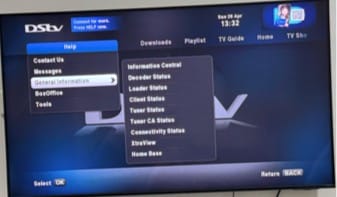
A: Press Menu on your remote → General Information → Subscription Details. You can also check instantly in the MyDStv App or self-service portal.

Frenzy valentine is a passionate blogger, developer, and entrepreneur. He is the founder and author of myfreshgists.com.
I have a brand new Samsung 50″ flat screen, I record a lot and am at 38%. When I watch a recorded programme the sound cuts out for about 50 seconds ! It drives me mad