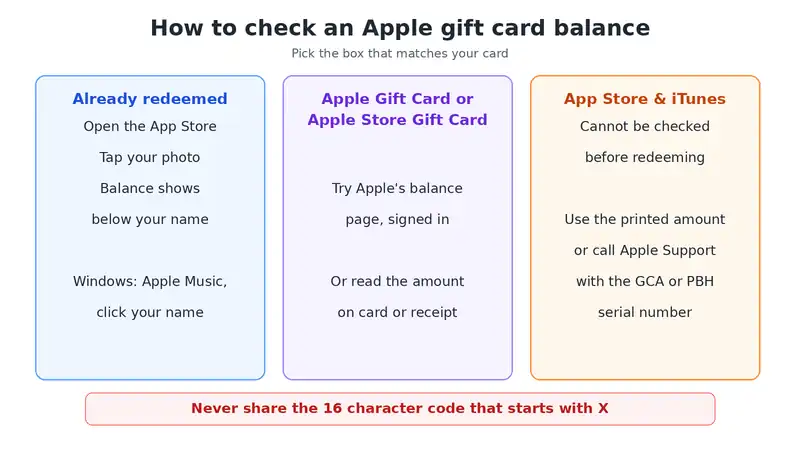
To check Apple gift card balance after redeeming, open the App Store on your iPhone and tap your photo. Your Apple Account balance shows below your name. For a card you have not redeemed yet, use the amount printed on it, Apple’s online balance page or Apple Support.
The answer also depends on which card you hold. Apple sells three kinds, and older App Store & iTunes cards cannot be checked before you redeem them. This guide explains each type, the steps that work and the mistakes that cost people money, especially outside the US.
Which Apple Gift Card Do You Have?
Apple sells three main card types: the Apple Gift Card, the App Store & iTunes Gift Card and the Apple Store Gift Card. Each one is checked and spent differently, so identify yours first.
- Apple Gift Card: a colourful Apple logo on a white card. Apple says you can spend it on products and accessories at an Apple Store or apple.com, or redeem it for apps, subscriptions and more.
- App Store & iTunes Gift Card or App Store Card: usually blue with a patterned front and a white Apple logo. These are for apps, games, music, films and iCloud storage.
- Apple Store Gift Card: a solid grey, white, silver or gold front. It works in Apple’s online and retail stores, not in the App Store or iTunes Store.
Older designs, such as the pink and orange iTunes Store card or the Apple Music card, still work. Follow the steps printed on the back.
How to Check Your Apple Gift Card Balance After Redeeming
Once you redeem a card, its value joins your Apple Account balance. You view that balance in the App Store on an iPhone or Mac, or in Apple Music on Windows.
On iPhone or iPad
- Open the App Store.
- Tap your photo or initials at the top of the screen.
- Your balance appears below your name. If it does not, there is no money on the account.
In some countries, the balance also shows in the Wallet app.
On a Mac
- Open the App Store.
- Click your name in the sidebar, or sign in first.
- Your balance appears below your name.
On a Windows PC
Open the Apple Music app or the Apple TV app and click your name at the bottom of the sidebar. Your account details, including the balance, appear there.
If the balance looks wrong
Apple suggests signing out of the App Store and signing back in. This refreshes the balance. Next, check your purchase history, because a subscription such as iCloud+ may have used part of it.
How to Check Apple Gift Card Balance Without Redeeming It
You can check some unredeemed cards on Apple’s balance page, but not all of them. App Store & iTunes Gift Cards cannot be checked before redeeming. For those, the printed amount or Apple Support is your only option.
Use Apple’s balance page
Apple’s help article links to a balance page at secure.store.apple.com/shop/giftcard/balance. Sign in with your Apple Account, then enter the card details. This page is meant for Apple Store Gift Cards and many Apple Gift Cards. However, users report that it does not work for every card or every country, so treat it as a first try.
Read the card, receipt or email
Fixed value cards show the amount on the front or the card holder. Variable cards show it on the store receipt. For an emailed card, the amount appears in the original email. This is often the quickest answer.
Contact Apple Support
In the US, call 800 275 2273 and say “gift cards”, or start a chat on Apple’s support site. Give the serial number, which starts with GCA, PBH or EPY. Never give the 16 character code that starts with X, because that code is the money itself. Some readers have had agents confirm whether a card is active. Apple does not promise a balance check by phone, though, so treat it as worth asking.
Why redeeming is usually safest
Redeeming does not spend anything. It moves the value into your own Apple Account, where nobody else can use it. So if the card is yours to keep, redeeming it is the fastest way to know the balance.
How to Redeem an Apple or iTunes Gift Card
- Find the 16 digit code on the back. On a physical card, gently scratch off the label.
- In the App Store, tap your photo or initials, then tap Redeem Code.
- Tap Use Camera to scan the card, or enter the code by hand.
- Tap Redeem. Your new balance shows straight away.
On Windows, open Apple Music or Apple TV, click your name, then click Redeem. Enter the code that starts with X. Look closely at letters that look alike, such as B and 8, O and 0, or S and 5.
Apple Gift Card Won’t Redeem? Common Errors and Fixes
Apple lists a few common error messages. Each one has a simple cause.
- “Card is not valid”: you may have an Apple Store Gift Card, which does not work in the App Store. You may also have typed the wrong code, so check it starts with X.
- “Card has already been redeemed”: it may already be in your account. Sign out and back in on all devices, then check your balance.
- “Card is not activated”: the shop did not activate it at the till. Take it back with your receipt.
- “Code must be redeemed in a different country or region”: the card was bought in another country. See the next section.
- Scratched or unreadable code: contact Apple Support with photos of both sides, the receipt and the serial number.
Using a US Apple Gift Card in Nigeria and Other Countries
Apple gift cards only work in the country where they were bought. A US card needs an Apple Account set to the United States, so it will not redeem on a Nigerian, Ghanaian or Kenyan account.
This catches many readers in Africa who receive US cards from family or clients. Before you accept one, check your account’s country in Settings, under your name, then Media and Purchases. Changing your account’s country is possible, but Apple asks you to spend any existing balance and cancel subscriptions first. You also need a payment method from the new country, or none at all.
So the safest choice is to ask the sender for a card from your own country, if Apple sells one there. Otherwise, ask them to buy the app or subscription for you as a gift instead.
Selling Apple Gift Cards for Cash: The Real Risks
In Nigeria and elsewhere, many people trade iTunes and Apple cards for naira on chat apps. Be careful. Apple’s terms say gift cards cannot be redeemed for cash, and the buyer only needs your code to take the full value. If they disappear after you send it, Apple cannot reverse a redeemed card.
Also, some buyers claim they will “check the balance first”. They cannot do this without the code, so never send it before you are paid. If the card is yours, redeeming it yourself keeps the value safe.
Apple Gift Card Scams to Watch For
Apple gift cards can only be used for Apple products and services. Anyone who asks you to pay a bill, a fine or a fee with them is a scammer.
Apple warns about these signs:
- The caller says it is urgent and you must pay now.
- Someone claims to be from the tax office, a utility, the police or Apple itself.
- You are asked to read out the code or send a photo of the back.
- A website offers to “check your balance” if you type in the code.
If you already shared a code, contact Apple Support at once. In the US, also report it at ReportFraud.ftc.gov. Acting quickly gives you the best chance of saving the money.
Common Questions About Apple Gift Card Balance
Do Apple gift cards expire?
Apple gift cards in the US do not have an expiry date. Your Apple Account balance also stays until you spend it.
Can I check an iTunes gift card balance online?
Not before redeeming. Redeem the card, then view your balance in the App Store. The printed amount tells you the value before that.
Can I use my balance for Apple Music or iCloud+?
Yes. Your balance pays for subscriptions, apps and media. Some subscriptions use it automatically, so check your purchase history if it drops.
Can I move my balance to another Apple Account?
No. Once redeemed, the balance stays on that account. If you want to give a card away, do it before anyone redeems it.
What if I have an Amazon card instead?
See our guide to checking an Amazon gift card balance. For store cards, see checking a Walmart gift card balance.
Check Your Apple Gift Card Balance the Safe Way
To check Apple gift card balance, redeem the card and look below your name in the App Store. Before redeeming, rely on the printed amount, Apple’s balance page or Apple Support, and never share the X code. If you also use an Apple TV, our Apple TV setup guide may help. For Apple’s own steps, read its guide to checking your Apple Account balance.

Frenzy valentine is a passionate blogger, developer, and entrepreneur. He is the founder and author of myfreshgists.com.