Losing an Amazon gift card is stressful, especially when there’s real money on it. What you can do about it depends almost entirely on one thing: whether the card was electronic or physical. One is often recoverable. The other usually is not.
This guide covers what genuinely works for each, how to check whether a card has already been used, and the honest limits of what Amazon can do.
On This Page
- Recovering an electronic gift card
- Recovering a physical gift card
- Can you see who redeemed it?
- How to check if a card was already used
- Protecting yourself next time
- Common questions
How to Recover an Electronic Amazon Gift Card
If you bought an electronic Amazon gift card and it was lost, never arrived, or went to the wrong email, you can resend it yourself from Your Orders. Resending creates a new card and deactivates the old one, so the lost code becomes useless.
This is the good news case, and it only works if the card has not already been redeemed. Here is how.
Go to Your Orders on the Amazon website or app. Find the gift card order and open its Order Details. Select Resend next to the gift card, review the information, and follow the on-screen steps. Amazon may ask you to verify your payment details for security.
Once done, Amazon issues a fresh card and cancels the original, then sends you a confirmation. You can resend the same gift card up to five times.
One important sign to watch for. If the Resend option is missing, the card has most likely already been redeemed by someone, and there is nothing further to resend. That tells you the balance is already gone.
How to Recover a Physical Amazon Gift Card
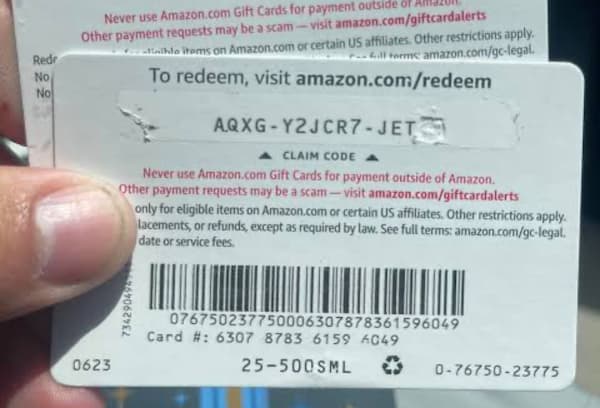
Physical gift cards are much harder to recover. If you bought the card yourself from Amazon, have proof of purchase, and it has not been redeemed, Amazon may cancel it and replace the balance. A physical card someone else gave you usually cannot be reissued.
Be realistic here, because this is where most people’s hopes do not match the policy.
Amazon states plainly that it is not responsible for lost or stolen gift cards, and the risk of loss passes to you once the card is in hand. That said, it is still worth contacting Amazon customer support, giving them the gift card serial number and your proof of purchase. If the card is traceable to your purchase and has not been used, they can sometimes cancel it and credit the balance to your account.
Your chances are far better if you act quickly, before whoever found the card redeems it. The window matters more than anything else.
What about the police?
Older advice suggests reporting a stolen gift card to the store and the police. In practice, this rarely helps. Investigating who redeemed a gift card would require a subpoena to Amazon, and law enforcement will not pursue that for a small sum. It is only realistic if the card is part of a much larger theft. For a single lost card, your energy is better spent contacting Amazon fast.
Can You See Who Redeemed an Amazon Gift Card?
No. Amazon does not let you see who redeemed a gift card, and it will not disclose that information even if you contact support. This is a deliberate privacy protection, since gift card activity is tied to another customer’s account.
This disappoints a lot of people, but the reasoning is sound. Amazon does not reveal one customer’s account activity to another, and a redeemed gift card balance sits inside the account that claimed it. The only way to know whether someone you gifted a card to has used it is to ask them directly.
So while you cannot identify who used a lost card, you can at least confirm whether it has been used, which is the next section.

How to Check If a Gift Card Was Already Redeemed
To check whether a card has been redeemed into your own account, sign in to Amazon, open Accounts and Lists, and select Gift Cards. Your balance there shows whether a recent card was applied successfully.
This is useful in two situations: confirming a card you just redeemed actually went through, or checking a found card before assuming it still has value.
One common confusion worth clearing up. If you tap the redeem button twice in quick succession, Amazon may show “this card has already been used.” That message is often just the system reacting to your own second tap, not evidence that a stranger used it. Check your gift card balance to confirm whether the funds actually landed in your account before panicking.
You can also check a card’s balance without fully redeeming it, which our guide on checking an Amazon gift card balance without redeeming walks through.
Protecting Yourself Next Time
A few habits make a lost card far less painful.
For electronic cards, the card lives in your email and your Amazon order history, so it is recoverable as long as you can sign in. Keep your Amazon account secure with a strong password and two-step verification.
For physical cards, treat them like cash, because that is effectively what they are. Photograph both sides as soon as you buy one, so you have the claim code and serial number stored safely. Keep the receipt, since proof of purchase is the one thing that gives you any chance of a replacement.
And redeem a physical card into your Amazon account soon after buying it rather than carrying it around. Once the balance is in your account, a lost card is just a worthless piece of plastic.
Common Questions
Will Amazon replace a lost gift card?
Sometimes. An electronic card can be resent from Your Orders if it has not been redeemed. A physical card you bought yourself may be replaced if you have proof of purchase and it is unused. A physical card gifted by someone else usually cannot be reissued.
Can I recover a gift card if someone already redeemed it?
No. Once the balance has been claimed into an account, it cannot be reversed or transferred out, and Amazon will not disclose who redeemed it. Recovery only works before the card is used.
My card says “already redeemed” but I never used it. What happened?
Either you double-tapped the redeem button, which triggers that message harmlessly, or someone with access to the code genuinely used it. Check your gift card balance first. If the funds are not in your account and you never redeemed it, contact Amazon support quickly.
Does having the receipt help?
For a physical card, yes. The receipt proves you bought the card and is the main thing that gives Amazon a basis to cancel and replace an unredeemed card. Without it, your options are very limited.
How many times can I resend an electronic gift card?
Up to five times. Each resend generates a new card and deactivates the previous one, so only the most recent version works.
The Honest Summary
If your card was electronic, resend it from Your Orders before it gets redeemed, and you will likely recover it. If it was physical, act fast, contact Amazon with your serial number and receipt, and accept that recovery is possible but not guaranteed. In every case, you cannot see who redeemed a card, and once the balance is claimed, it is gone.
Speed is the single biggest factor. The sooner you act after losing a card, the better your odds. For the official process and the current resend tool, Amazon’s official guide to resending a digital gift card is the authoritative place to start.

Frenzy valentine is a passionate blogger, developer, and entrepreneur. He is the founder and author of myfreshgists.com.