
Last updated: May 2026
Wondering how to transfer money from your Amazon Pay balance to your bank account? You are not alone. Millions of shoppers, sellers, and gig workers accumulate funds in their Amazon Pay accounts — from refunds, Amazon Mechanical Turk earnings, or seller proceeds and want to move that money to a real bank account quickly and safely.
This 2026 guide covers everything you need to know: whether an Amazon balance transfer to a bank account is even possible, the exact steps for both the US and India, how long transfers take, fees and limits, common problems with fixes, and what happens with Amazon Gift Card balances. Whether you are searching for amazon pay send money options or simply want to send money from Amazon Pay to your checking account, this guide has you covered.
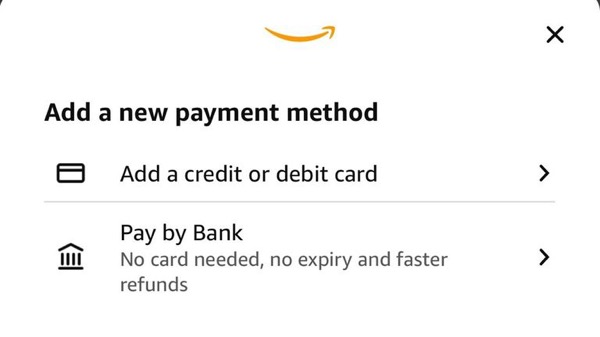
Can You Transfer Money from Amazon Pay Balance to Bank Account?
Yes, you can — but with important conditions. Amazon Pay is Amazon’s digital wallet service, available in the US, Japan, the UK, several EU countries, and India (where it operates through UPI). The ability to transfer money from Amazon Pay to a bank account depends on your country and account type.
In the United States, if you have a positive Amazon Pay balance — from refunds, Mechanical Turk payments, or other Amazon credits — you can withdraw it directly to a linked US bank account via the Amazon Pay website. There is no fee from Amazon’s side, and the minimum withdrawal is just $1.00.
In India, Amazon Pay works as a full UPI wallet. You can send money from Amazon Pay to any UPI-linked bank account, pay bills, or transfer funds to friends and family — all from within the Amazon app.
Amazon Pay Balance vs Amazon Gift Card Balance – Key Differences
Many users confuse these two, and it causes a lot of frustration. Here is a clear breakdown of how they differ — especially when it comes to whether an amazon money transfer to a bank account is possible.
| Feature | Amazon Pay Balance | Gift Card Balance |
|---|---|---|
| Source of funds | Refunds, MTurk, seller payouts, top-ups | Purchased or received gift cards |
| Transfer to bank account | ✓ Yes (US & India) | ✗ Not possible |
| Send to another person | Yes (India via UPI) | No |
| Use for Amazon purchases | ✓ Yes | ✓ Yes |
| Expires | Varies by account | No (most US gift cards) |
| Shown in account | Amazon Pay dashboard | Separate Gift Card section |
Understanding this distinction will save you time. All the steps for amazon pay to bank account transfers in this guide apply specifically to your Amazon Pay balance, not your Gift Card balance.
Requirements Before Transferring Amazon Pay Balance to Bank
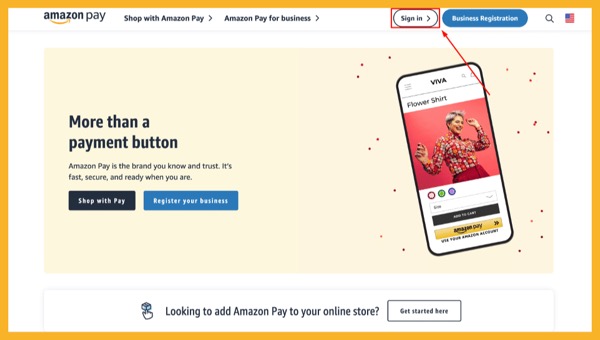
Before you initiate any Amazon Pay bank account transfer, make sure you meet these requirements to avoid failed transactions or account issues.
- Active Amazon account: You must be logged into a valid Amazon.com account with two-step verification enabled.
- Positive Amazon Pay balance: You need at least $1.00 in your Amazon Pay balance (the minimum withdrawal amount).
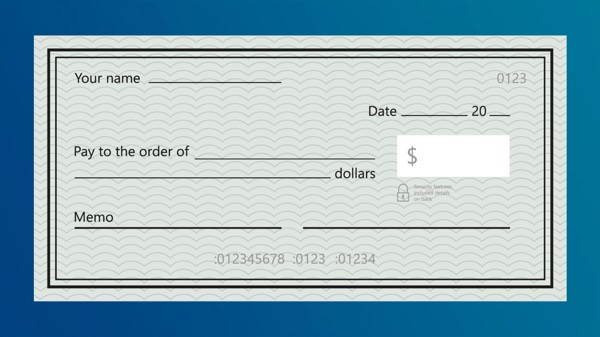
- Verified US bank account: Your bank account must be added and verified on the Amazon Pay platform. Amazon uses ACH (Automated Clearing House) for transfers, so your bank must support ACH deposits from external sources.
- US-based bank account (for US method): Only US bank accounts are supported for the withdraw-to-bank feature on pay.amazon.com.
- Identity verification: Amazon may require ID verification before allowing withdrawals, especially for larger amounts or new accounts.
- No account restrictions: Your account must be in good standing with no holds, suspensions, or fraud flags.
How to Transfer Amazon Pay Balance to Bank Account (US Method)
The primary method for US users to transfer Amazon Pay balance to a bank account is through the official Amazon Pay website at pay.amazon.com. Here is a full walkthrough.
Step 1 – Add and Verify Your Bank Account
If you have not already linked a bank account, you must do this first.
- Go to pay.amazon.com and sign in with your Amazon credentials.
- Click on your name or account icon in the top-right corner, then select “Account Settings”.
- Under the “Bank Accounts” section, click “Add a bank account”.
- Enter your bank’s routing number and your account number. Double-check these — errors will cause transfer failures.
- Amazon may send two small micro-deposits to your bank within 1–2 business days. Verify those amounts in your Amazon Pay account to confirm ownership.
Step 2 – Withdraw Funds to Your Bank
- Return to pay.amazon.com and sign in.
- Click “Shoppers” from the top menu if prompted, then navigate to your account dashboard.
- Locate and click “Withdraw Funds” (visible when you have a positive balance).
- Select your verified bank account from the dropdown list.
- Enter the amount you want to transfer — minimum $1.00.
- Review the details carefully, then click “Continue” and confirm.
- You will see a confirmation screen. A pending transaction will appear in your Account Activity.
Once submitted, you can track the status of your amazon balance transfer to bank account by logging back into pay.amazon.com and checking Account Activity. The status will show either “Pending,” “Success,” or “Failure.”
How to Transfer Amazon Pay Balance to Bank Account (India App Method)
Indian users enjoy a more feature-rich Amazon Pay experience. The Amazon Pay India service is UPI-powered, which means amazon pay send money to any bank is fast, usually instant, and deeply integrated into the Amazon app. Here is how to do it.
Setting Up Amazon Pay UPI in India
- Open the Amazon Shopping App on your Android or iOS device.
- Tap the “Pay” option from the home screen or the bottom navigation bar.
- If you have not set up Amazon Pay UPI before, tap “Set Up UPI” and follow the prompts to link your bank account. You will need your debit card details for verification.
- Amazon will generate a UPI ID for you (typically in the format yourphone@amazon).
Sending Money or Transferring to Bank via Amazon Pay India
- Open the Amazon app and tap “Pay”.
- Tap “Send Money” or “Transfer to Bank.”
- Enter the recipient’s UPI ID, phone number, or bank account details (IFSC + account number).
- Enter the amount and an optional note.
- Tap “Send” and authenticate with your UPI PIN.
- The transfer is usually instant or completed within a few hours, depending on the receiving bank.
Step-by-Step Guide: Withdraw Funds from Amazon Pay (Desktop)
If you prefer using a laptop or desktop computer to manage your amazon payments send money and withdrawals, here is the complete desktop process in detail.
- Navigate to the Amazon Pay site: Open your browser and go to pay.amazon.com.
- Sign in: Click “Sign In” and enter your Amazon email and password. Complete two-step verification if prompted.
- Access your dashboard: After logging in, you will land on your Amazon Pay account overview. Your current balance is displayed prominently.
- Click “Withdraw Funds”: This button appears beneath or near your balance total. If you do not see it, ensure you have a balance greater than $1.00 and a verified bank account linked.
- Select your bank account: From the dropdown or list, choose the verified bank account you want to send funds to. If no account is listed, click “Add a bank account” first.
- Enter the withdrawal amount: Type the dollar amount. The field will show your available balance. You cannot withdraw more than your balance.
- Review and confirm: A summary screen shows the amount, destination account (last 4 digits), and estimated arrival time. Click “Confirm” or “Submit”.
- Check Account Activity: Return to the Activity tab to see the pending transaction. You will receive an email notification from Amazon confirming the withdrawal request.
That is the complete desktop flow for a transfer money from amazon to bank account operation. Keep the confirmation email for your records in case of any disputes.
Step-by-Step Guide: Send Money from Amazon Pay to Bank (Mobile App)
For US users who prefer mobile, the Amazon Shopping app does give you access to Amazon Pay account settings, though the full withdrawal interface is best done via the mobile browser at pay.amazon.com. Here is how to do it seamlessly on your phone.
- Open your mobile browser (Chrome, Safari, etc.) and visit pay.amazon.com.
- Sign in with your Amazon credentials. If you are already logged into the Amazon app, signing in here is quick via the same email/password or biometric login on some devices.
- Tap the balance display or look for “Withdraw Funds” on the mobile-formatted dashboard.
- Select your bank account from the list. If needed, tap “Add bank account” to link one now.
- Enter the withdrawal amount using the numeric keypad. The minimum is $1.00.
- Tap “Continue,” review the summary, and tap “Confirm” to submit the transfer.
- Check your email — Amazon will send a confirmation. You can also check Account Activity on the site to see the pending transaction.
How Long Does the Transfer Take? Fees, Limits & Processing Time
One of the most common questions about amazon money transfer to a bank account is how long it takes and what it costs. Here is everything you need to know.
| Detail | US (ACH) | India (UPI) |
|---|---|---|
| Transfer fee | $0 (free) | ₹0 (free) |
| Minimum amount | $1.00 | ₹1 |
| Maximum per transfer | Your available balance (limits may apply) | ₹1 lakh/day (standard UPI limit) |
| Processing time | 3–5 business days | Instant to a few hours |
| Weekends/holidays | Not counted | 24/7 (UPI) |
| Transfer method | ACH bank transfer | UPI / IMPS |
| Bank fee | Usually none | Usually none |
For US transfers, the 3–5 business day window is standard for ACH transactions across the US banking system. If you initiate a withdrawal on Friday, the earliest you might see the funds is the following Wednesday or Thursday. Amazon itself does not impose additional delays beyond this standard ACH timeline.
Failed transfers do not result in lost money — your funds are automatically returned to your Amazon Pay balance, usually within 1–2 business days of the failure notification.
Common Problems When Transferring Amazon Pay to Bank + Fixes
Even when you follow every step correctly, transfers can sometimes run into issues. Here are the most frequent problems users face when trying to send money from Amazon Pay to a bank — and how to fix each one.
Problem 1: “Withdraw Funds” Button Is Missing or Grayed Out
Fix: This usually means you have no withdrawable balance, your bank account is not verified yet, or your account has a restriction. Check that your balance is above $1.00 and that your bank account shows as “Verified” in Account Settings. If there is an account flag, contact Amazon Pay support.
Problem 2: Transfer Fails After Submission
Fix: The most common cause is your bank account not accepting ACH deposits from external sources. Call your bank and ask them to enable incoming ACH transfers from “Amazon Payments Inc.” Then, try removing and re-adding your bank account on pay.amazon.com before attempting the withdrawal again.
Problem 3: Wrong Bank Account Details Entered
Fix: If your bank account routing number or account number was entered incorrectly, the transfer will fail. Remove the incorrect account from Amazon Pay, add the correct details, complete the micro-deposit verification process, and then retry the transfer. Never guess — confirm your routing and account numbers directly from your bank’s app or a check.
Problem 4: Transfer Is Pending for More Than 5 Business Days
Fix: First, check your Account Activity on pay.amazon.com to confirm the status is still “Pending” (not “Failed”). If it has been over 5 full business days, contact Amazon Pay customer support with your transaction ID and the confirmation email. Also, check with your bank if there is an incoming deposit flagged or held.
Problem 5: Identity Verification Required
Fix: Amazon may request ID verification (government-issued photo ID) before processing withdrawals above certain thresholds or for accounts flagged for review. Complete the verification through the link provided in the email from Amazon. This is a one-time process for most accounts.
Problem 6: Account Suspended or Balance on Hold
Fix: If Amazon has placed a hold on your account — common for sellers whose accounts have been flagged — you will need to resolve the underlying account issue first. Contact Amazon Seller Support or Amazon Pay support directly and provide any requested documentation. Do not attempt workarounds; resolving the root cause is the only reliable path.
Can You Transfer Amazon Gift Card Balance to Bank Account?
No — Amazon Gift Card balances cannot be transferred to a bank account. This is one of Amazon’s firm policies and it applies in all regions. Amazon Gift Card funds are intended solely for purchases on Amazon.com and eligible affiliated services. They cannot be converted to cash, moved to your Amazon Pay balance, or sent to a bank account via any official method.
This restriction is built into Amazon’s Gift Card terms of service and is not a bug or limitation that can be worked around through the platform. Any third-party site or person claiming they can transfer your Gift Card balance directly to your bank should be treated as a potential scam.
For detailed steps on checking and using your Amazon gift card balance, see our guide: How to Check Amazon Gift Card Balance Without Redeeming.
Safe Alternatives for Amazon Gift Card Balance
If you have Amazon Gift Card funds you want to convert or use strategically, here are legitimate options.
- Buy items and resell them: Purchase in-demand products with your Gift Card balance (electronics, books, household goods) and resell them on platforms like eBay, Facebook Marketplace, or OfferUp. This is the most common way people effectively “cash out” Gift Card value, though it involves extra steps and time.
- Pay for services you already use: If you subscribe to Amazon Prime, Audible, Kindle Unlimited, or AWS, your Gift Card balance can cover those charges — freeing up real money in your bank account that you would otherwise have spent.
- Gift card exchange platforms: Legitimate platforms like Raise, CardCash, or Gift Card Granny allow you to sell your Amazon Gift Card balance for a slightly reduced cash value (typically 70–90 cents per dollar). These are real businesses and a valid route if you need cash and do not plan to shop on Amazon.
- Gift it to someone who shops on Amazon: Transfer the card’s code to a friend or family member who regularly buys on Amazon, and have them pay you in cash or via Venmo, PayPal, or Zelle. A straightforward peer arrangement.
Amazon Money Transfer Comparison Table
Here is a quick-reference summary to help you understand all your options for amazon payments send money and transfers in 2026.
| Method | Region | Bank Transfer? | Fee | Speed |
|---|---|---|---|---|
| Amazon Pay → Bank (ACH) | US | ✓ Yes | Free | 3–5 business days |
| Amazon Pay → UPI Bank | India | ✓ Yes | Free | Instant / few hours |
| Amazon Gift Card → Bank | All | ✗ No | N/A | N/A |
| Gift Card Exchange Site | US | Indirect cash | 10–30% | 1–3 days |
| Amazon Seller Disbursement | Global | ✓ Yes | Varies | 1–5 business days |
| Amazon MTurk Payout | US / Global | ✓ Yes (or Gift Card) | Free | 1–2 business days |
FAQs About Amazon Pay Send Money & Bank Transfer
Q: Can you send money through Amazon Pay to another person in the US?In the US, Amazon Pay is primarily designed for paying merchants and withdrawing balances to your own bank account — not peer-to-peer transfers between individuals. For sending money to another person, consider services like Zelle, Venmo, or PayPal. In India, Amazon Pay’s UPI feature does support peer-to-peer transfers.
Q: How do I send money from Amazon Pay balance specifically?Log in to pay.amazon.com, click “Withdraw Funds,” select your linked bank account, enter the amount, and confirm. Your Amazon Pay balance will be debited and the funds sent to your bank via ACH.
Q: What is amazon.com/getpaid and how does it work?amazon.com/getpaid is Amazon’s portal for setting up how you receive payments from Amazon. It is used by Amazon Mechanical Turk workers, third-party sellers, Amazon Associates affiliates, and other program participants to configure their bank account or payment method. If you have earnings from any Amazon program, this is where you set up your payout destination.
Q: What is mypay amazon (Amazon MyPay)?“mypay amazon” typically refers to Amazon’s employee pay portal, where Amazon warehouse and delivery workers can view their pay stubs, manage direct deposit, and track earnings. It is separate from Amazon Pay (the consumer wallet). Amazon employees access it through their internal HR systems or via ADP/third-party payroll platforms.
Q: Can you send money from Amazon Pay balance to a PayPal account?No — there is no direct link between Amazon Pay and PayPal. You would need to first withdraw your Amazon Pay balance to your bank account (3–5 business days), and then transfer from your bank to PayPal if needed.
Q: Is there a daily or monthly limit on Amazon Pay withdrawals?Amazon does not publicly publish a single universal limit, but there are per-transaction and account-level caps. Newly added bank accounts or accounts that trigger identity verification may have lower initial limits. For your specific limits, check within your Amazon Pay account dashboard or contact Amazon Pay support.
Q: How do I know if my Amazon Pay transfer was successful?Log in to pay.amazon.com and go to “Account Activity.” The transaction will show a status of “Pending,” “Success,” or “Failure.” Amazon also sends email notifications for each stage of the transfer. If it shows “Success,” check your bank account — it may take an additional 1 business day for the funds to appear after Amazon marks it successful.
Q: Can I use Amazon Pay to pay someone’s bank account directly (like a bill payment)?In India, yes — Amazon Pay’s UPI feature supports bill payments, bank transfers, and merchant payments from your linked bank or wallet balance. In the US, Amazon Pay is not designed for arbitrary bill payments to third-party bank accounts. It is limited to Amazon merchant payments and withdrawals to your own verified bank account.
Q: What happens if my Amazon Pay bank transfer fails?If the transfer fails — due to incorrect bank details, your bank rejecting the ACH, or an account issue — Amazon will automatically return the funds to your Amazon Pay balance within 1–2 business days. You will receive a failure notification by email. Review the reason, fix the underlying issue, and retry the withdrawal.
Conclusion: Transferring Money from Amazon to Bank Account Made Easy
Getting your money out of Amazon and into your bank account is straightforward once you know the process. To recap: Amazon Pay balance can be transferred to a US bank account for free, with a $1.00 minimum, in 3–5 business days through pay.amazon.com. Indian users have an even faster option through Amazon Pay’s UPI integration, with near-instant transfers available 24/7.
Remember the key distinction: your Amazon Pay balance is fully withdrawable to a bank account, while your Amazon Gift Card balance is not — and there is no official workaround for the Gift Card limitation. If you are trying to convert Gift Card value to cash, your best legitimate options are through gift card exchange platforms or buying and reselling items purchased with the card.
Whether you are searching for how to transfer money with Amazon, understand your amazon account pay options, or simply want to know how to send money from Amazon Pay efficiently — this guide has walked you through every step and scenario for 2026.
If you found this guide helpful, share it with someone who might be struggling with their Amazon Pay balance. Have a question we did not cover? Drop it in the comments below and we will do our best to help.

Frenzy valentine is a passionate blogger, developer, and entrepreneur. He is the founder and author of myfreshgists.com.
2 thoughts on “How to Transfer Money from Amazon to Bank Account in 2026 (Amazon Pay Balance)”