
Last verified: 2026.
Before You Start
There’s one thing to know upfront: Amazon gift card balances are tied to your Amazon account, not to the physical card or email itself. Once you’ve redeemed a card, the dollar amount gets added to your account’s gift card balance, and that’s where you’ll always find it — inside your account settings.
This means you need to be signed into the right Amazon account to see the balance. If you have more than one Amazon account (which happens more often than people realize), make sure you’re logged into the one where you originally redeemed the card. If you redeemed a $50 card on one account and you’re logged into a different one, the balance will show $0 — which can be a bit alarming until you realize what happened.
Also worth noting: Amazon.com balances only work on Amazon.com. If you’re in a different country and using a localized Amazon store (like Amazon.co.uk or Amazon.ca), those are separate platforms with their own accounts and gift card balances. A US gift card won’t show up on a UK account.
How to Check Your Amazon Gift Card Balance on Desktop
This is the most straightforward method. Open a browser on your computer, go to amazon.com, and make sure you’re signed in. You’ll see your name in the top right corner if you are.
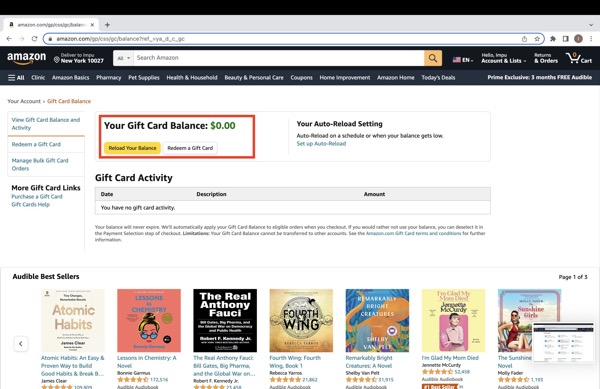
- Hover over Account & Lists in the top navigation bar. A dropdown menu will appear.
- Click Gift cards from the dropdown. It’s usually in the second or third section of the menu.
- You’ll land on the Gift Cards page. Your current gift card balance is displayed prominently near the top, usually under a heading like “Your Gift Card Balance.”
That’s it. If your balance shows $0.00 and you’re sure you’ve redeemed a card, double-check that you’re logged into the correct account. You can verify by clicking Account & Lists → Account and looking at the email address on file.
Alternatively, you can go directly to the balance page by navigating to amazon.com/gc/balance. Amazon may redirect you through a login screen if your session has expired, but it’ll drop you right on the balance page once you sign in.
How to Check Your Amazon Gift Card Balance on a Mobile Browser
If you’re using Safari, Chrome, or any other browser on your phone rather than the Amazon app, the process is similar to desktop but the navigation looks a little different on a smaller screen.
- Go to amazon.com in your mobile browser and sign in.
- Tap the menu icon — it’s usually three horizontal lines (☰) in the top left or bottom of the screen depending on your browser.
- Tap Account or Sign In if you haven’t already.
- Scroll down to find Gift cards & balance and tap it.
- Your balance will appear on the next screen.
On some mobile browsers, Amazon will nudge you to open the app instead. You can dismiss that prompt and continue in the browser if you prefer. The balance information is the same either way.
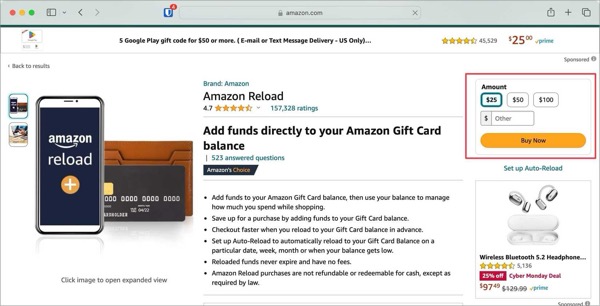
A quicker route on mobile: just type amazon.com/gc/balance directly into your browser’s address bar. It takes you straight to the balance page after signing in.
How to Transfer Money from Amazon to Bank Account in 2026 (Amazon Pay Balance)
How to Check Your Amazon Gift Card Balance on the Amazon App
If you have the Amazon shopping app installed on your phone (iOS or Android), this is probably the easiest method once you know where to tap.
- Open the Amazon app and make sure you’re signed in.
- Tap the profile icon or the menu icon (☰) — on most versions of the app this is at the bottom of the screen or in the top left.
- Tap Account.
- Scroll down and tap Gift cards & balance.
- Your remaining balance is displayed at the top of the screen.
The app layout does get updated from time to time, so the exact label might vary slightly. If you can’t find “Gift cards & balance,” look for anything labeled “Gift cards,” “Wallet,” or “Balance.” You can also use the app’s search bar and search “gift card balance” — it will usually surface a direct link.
What If You Haven’t Redeemed the Card Yet?
If you’re holding a physical gift card and you haven’t applied it to your account yet, you won’t see any balance — because technically the money isn’t in your account yet. The card just has a claim code on it (usually on the back, under a scratch-off strip), and that code needs to be entered into your Amazon account to unlock the funds.
Here’s how to redeem a physical Amazon gift card:
- Sign in to your Amazon account on desktop or the app.
- Go to Account & Lists → Gift cards (or navigate to amazon.com/gc/redeem).
- Scratch off the back of the card to reveal the claim code.
- Enter the claim code in the field provided and click Apply to your balance.
- The amount will be added to your account immediately and you’ll see the updated balance on the same page.
Once redeemed, the claim code is used up. The value now lives in your account balance and the physical card itself has no further use. Don’t throw it away immediately if the amount seems wrong — but once the balance is confirmed, the card can be discarded.
One thing people sometimes wonder: do you have to redeem a gift card before using it? Yes. Amazon doesn’t let you enter a claim code at checkout in most cases. You need to redeem it to your account first, then your gift card balance is automatically applied at checkout when you place an order (as long as you choose to use it).
Checking the Balance on an Amazon E-Gift Card
An Amazon e-gift card is just a digital version of the physical card. Instead of a plastic card, you get an email with a claim code in it. The process for checking the balance is exactly the same — you redeem the claim code to your account and then check your account balance.
If you received an e-gift card but aren’t sure whether you already redeemed it, here’s a quick way to check: go to your gift card balance page. If the balance is higher than zero (or higher than you expected), the code has likely already been applied. If you see $0 and you expected a balance, search your email for the original gift card email and look at the claim code. You can enter that code on the redemption page — Amazon will tell you if it’s already been used, and if it hasn’t, it’ll add the amount right away.
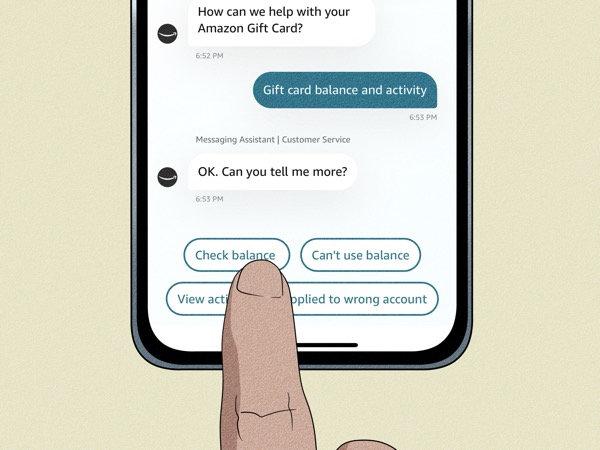
If you’ve lost the e-gift card email or the code isn’t working, Amazon’s customer service can help. You’ll want to have the order number from the original purchase, or the email address of whoever sent you the card. Amazon support via chat is usually the fastest route for this kind of issue.
What Happens When You Have Multiple Gift Cards
If you’ve redeemed more than one Amazon gift card — say, you got three gift cards as birthday presents and applied all of them — Amazon doesn’t keep track of each card separately. It combines all of them into a single gift card balance on your account.
So if you redeemed a $25 card, a $50 card, and a $10 card, your balance page will simply show $85. There’s no way to see a breakdown of which card contributed what, or when each one was redeemed, from the balance page itself.
If you need a transaction history — for example, to track when you received or used gift card funds — you can find it under Account & Lists → Account → Gift card activity. This shows a log of when gift card amounts were added to or deducted from your balance, which is useful if you’re trying to reconcile spending or verify that a specific card was properly applied.
Also worth knowing: if you’re shopping and your gift card balance doesn’t cover the full order total, Amazon will automatically charge the remaining amount to your default payment method. You don’t need to do anything special — it handles the split automatically at checkout.
Common Questions About Amazon Gift Cards
Do Amazon gift cards expire?
No. Amazon gift cards in the US have no expiration date. There are also no monthly maintenance fees, no dormancy fees, and no other charges that would reduce your balance over time. Whatever you have on your balance today will still be there in five years if you don’t spend it. This is actually required by federal law in the US for gift cards that don’t expire within five years — but Amazon goes further and simply doesn’t set an expiration date at all.
If you see a gift card somewhere that claims to be an “Amazon gift card” but has an expiration date printed on it, be cautious. That’s not standard for legitimate Amazon gift cards.
Can I transfer my Amazon gift card balance to another account or to my bank?
No. Once a gift card has been redeemed to an Amazon account, the balance is locked to that account. You can’t transfer it to a different Amazon account, and you can’t withdraw it to a bank account or PayPal. Amazon gift card balances can only be spent on purchases through Amazon.com and services that accept Amazon payments.
If you want to give the value to someone else and the card hasn’t been redeemed yet, the best approach is to simply forward the claim code (from an e-gift card) or hand over the physical card before either of you redeems it. Once it’s in an account, it stays there.
Can I use my Amazon gift card balance on Amazon Prime or other subscriptions?
Yes, in most cases. Amazon gift card balances can be used to pay for Amazon Prime memberships, Kindle Unlimited, Amazon Music, and other Amazon subscriptions. At checkout or on the subscription payment page, your gift card balance will be listed as a payment option. Just make sure it’s selected before confirming.
There are some exceptions — certain third-party sellers on Amazon and some digital content purchases may not accept gift card balances as payment. If your balance isn’t being applied on a particular purchase, check the payment options on the order page to see whether gift cards are accepted for that specific item.
What should I do if my gift card balance is wrong or missing?
First, make sure you’re logged into the right account — this solves the problem more often than anything else. If you’re confident you’re in the right account and the balance is still off, go to Account → Gift card activity and look through the transaction history. You might find the balance was spent on a previous order you forgot about.
If the balance genuinely seems missing or incorrect and you have the original gift card or claim code, contact Amazon customer service. Chat support is typically faster than phone. Have the claim code and any order confirmation emails ready — they can look up the card’s redemption history on their end.
Is it safe to buy Amazon gift cards from third-party sellers?
It depends on the seller. Buying Amazon gift cards from established retailers like grocery stores, pharmacies, and big-box stores is generally fine. Where it gets risky is buying from individuals on resale platforms, classified ad sites, or anywhere that isn’t an authorized retailer. Gift card scams are common — a card that appears to have a full balance may have already been partially or fully drained if it was purchased from an untrustworthy source.
A good habit: if you receive a gift card from someone you don’t fully trust, redeem it to your account right away and verify the balance immediately. If the balance is different from what was advertised, report it before too much time passes.
Can I buy something that costs more than my gift card balance?
Yes. If your gift card balance is $30 and you’re buying something that costs $75, Amazon will apply your $30 gift card balance and charge the remaining $45 to your default payment method. The split happens automatically at checkout — you’ll be able to see the breakdown before you confirm the order.
What happens to my gift card balance if I close my Amazon account?
If you close your Amazon account, any unredeemed gift card balance associated with that account will be forfeited. Amazon’s terms of service state that account balances are non-refundable upon account closure. If you’re thinking about closing an account, spend down any remaining gift card balance first or contact Amazon support to see if there’s any option to transfer it. SIMPLE TIPS FOR AMAZON FIRE STICK BLACK SCREEN FIX
Quick Summary
Checking your Amazon gift card balance comes down to one simple path: sign into your account, go to Account & Lists → Gift cards, and your balance is right there at the top. You can do this on a desktop browser, a mobile browser, or through the Amazon app — the steps are slightly different on each but the destination is the same.
If you haven’t redeemed your gift card yet, you’ll need to do that first at amazon.com/gc/redeem before a balance will show up. And if something seems off — a missing balance, a lower-than-expected amount, or a claim code that isn’t working — Amazon’s customer support chat is the fastest way to get it sorted out.
Ready to check your balance? Sign in to your Amazon account →

Frenzy valentine is a passionate blogger, developer, and entrepreneur. He is the founder and author of myfreshgists.com.
1 thought on “How To Check Amazon Gift Card Balance Without Redeeming”