A T-Mobile gateway costs less than a fiber installation, sets up in fifteen minutes, and carries no contract. Fiber costs more, takes weeks to install, and locks you into a term agreement. On paper, T-Mobile 5G Business Internet looks like the easy win. In practice, the right choice depends entirely on what your office does every day. This comparison looks at real 2026 performance data, not marketing copy, to answer one question honestly: is T-Mobile 5G actually good enough to run your office on?
What T-Mobile 5G Business Internet actually delivers
T-Mobile’s business plans run on the same 5G network as its home internet service. Speeds depend on your distance from a tower and how much local traffic that tower is carrying. T-Mobile advertises a minimum of 25 Mbps download. Real-world reports tell a different story. Many small business users see 150 to 300 Mbps download in decent coverage areas, with upload speeds sitting in a much narrower band of 12 to 60 Mbps.

That upload number matters more than the download headline. Business plans come in three tiers: Rely, Amplified, and All-In. All three run on identical network infrastructure. The differences come down to equipment and add-ons, not speed caps, though T-Mobile has started capping its entry-level Rely plan at 354 Mbps download for new home subscribers as of June 2026. Business tiers have not seen that same cap applied yet, but the direction is worth watching.
Latency: the number nobody puts on the box
Latency measures how fast data makes a round trip, and it matters far more than raw speed for anything interactive. T-Mobile 5G Home and Business Internet averages around 40 milliseconds of latency. Fiber typically runs 10 to 20 milliseconds. That gap sounds small. It is not small once you put real applications on top of it.
A 40ms connection handles email, browsing, and most cloud apps without any noticeable delay. It starts to show up during video calls with several participants, real-time collaborative tools, and any workload sensitive to jitter, which is the variation in latency from one moment to the next. Fixed wireless connections are more prone to jitter than fiber because the signal travels through open air and competes with weather, buildings, and other devices on the same tower.
Video calls and VoIP: where the cracks start to show
T-Mobile’s own research and independent reviewers agree that 5G handles occasional video calls just fine. The trouble starts with volume and simultaneity. A single video call needs roughly 3 to 5 Mbps of upload for solid HD quality. With T-Mobile’s business upload speeds sitting between 12 and 60 Mbps, a small office running two or three calls at once has room to spare. Push past four or five simultaneous calls, and the upload ceiling starts to bite.
VoIP phone quality depends on more than raw bandwidth. It depends on consistent latency and low jitter. Fiber’s steady 10 to 20ms latency keeps call audio clean even under load. T-Mobile’s 40ms average, combined with the jitter that comes from a wireless signal competing for tower capacity, can introduce the occasional stutter or dropped syllable that fiber rarely produces. For a five-person office taking client calls occasionally, this is a non-issue. For a ten-person team running VoIP as its primary phone system all day, it becomes a real variable to test before committing.
Cloud backups and file uploads
This is the category where the gap between T-Mobile 5G and fiber shows up most clearly. Fiber delivers symmetric speeds, meaning upload matches download. A 1 Gbps fiber plan uploads at 1 Gbps. T-Mobile’s business plans deliver strong downloads but cap uploads far lower, typically in the 12 to 60 Mbps range regardless of how fast the download number looks.
For a business syncing a few files a day to Google Drive or Dropbox, this rarely causes a problem. For a business continuously backing up large client files, design assets, or video projects throughout the day, the upload ceiling becomes the bottleneck that decides how long every backup actually takes. A creative agency moving 10GB of video files will wait considerably longer on a 30 Mbps upload connection than on a fiber line uploading at 500 Mbps or more. If your business runs on continuous cloud sync, this single number should carry more weight in your decision than any other spec on the page.
POS systems and retail
Point-of-sale systems are the one workload where T-Mobile 5G genuinely performs on par with fiber for most small businesses. Transaction data is small. A card swipe or tap sends a tiny packet of information and waits for a similarly small response. Neither task requires much bandwidth or particularly low latency to work reliably.
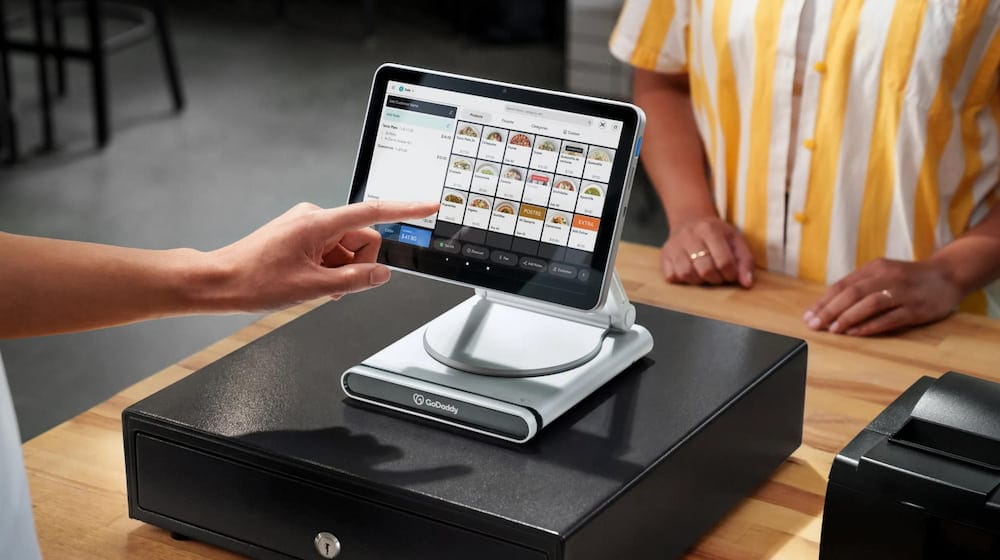
T-Mobile’s unlimited data and no-contract terms make it an attractive primary connection for a retail shop, food truck, or pop-up location where running a fiber line is impractical or impossible. Reports from small business owners using T-Mobile for exactly this purpose describe reliable day-to-day performance for payment processing, inventory software, and basic cloud tools. The bigger risk for retail is total outage rather than slow performance. If the local tower goes down or experiences an outage, the connection goes with it, and unlike a hardwired line, there is no physical cable to fall back on.
Remote and hybrid teams
For a small office where a handful of people occasionally work from home and the rest work in-office on a shared connection, T-Mobile 5G Business Internet handles the load reasonably well, provided the office has strong tower coverage. Cloud tools, shared drives, and moderate video call volume run acceptably within the plan’s bandwidth.
The math changes for a fully hybrid team where most staff connect back to shared office infrastructure throughout the day. Multiple people pulling from cloud storage, joining calls, and pushing files simultaneously will find the shared upload ceiling far sooner than a fiber connection would show any strain. If your team’s daily workflow depends on consistent access to a central server or VPN, fiber’s symmetric speed and lower latency give a meaningfully smoother experience once you scale past a handful of simultaneous users.
Reliability and uptime: the honest comparison
Fiber has a structural reliability advantage that no amount of network investment fully closes. A physical fiber line sitting underground is not affected by weather, tower congestion, or the number of other businesses on the same block using the same network. T-Mobile’s fixed wireless signal is. Speed and consistency depend on how close you sit to a tower and how much other traffic that tower carries at any given moment.
T-Mobile also applies data deprioritization during periods of network congestion for customers who pass roughly 1.2TB of monthly usage, meaning heavy users can see reduced speeds precisely when the network is busiest. Most small offices will not come close to that threshold, but it is worth knowing the policy exists.
On the other side of the ledger, T-Mobile 5G Business Internet has no annual contract and no early termination fee, so a disappointing connection is easy to walk away from. Fiber contracts typically run 12 months or longer, which raises the stakes on getting the decision right the first time. T-Mobile’s flexibility also makes it a genuinely strong backup connection, automatically taking over if a primary fiber or cable line drops, which is a role T-Mobile performs well regardless of whether it works as your primary line.
AT&T Business vs Spectrum vs Comcast: Which Is Best for Small Business in 2026?
Real 2026 pricing and contract terms
T-Mobile Business Internet pricing runs simpler than most wired providers. The Rely plan starts around $50 per month with autopay, dropping to roughly $35 with a qualifying T-Mobile voice line bundled in. The Amplified plan runs about $60 per month, or $45 bundled, and adds a mesh Wi-Fi access point along with advanced cybersecurity tools. The All-In plan sits around $70 per month, or $55 bundled, and adds a second mesh device plus Microsoft 365 for qualifying accounts. All three plans include the 5G gateway equipment at no extra charge, carry no installation fee since setup is self-service, and come with a 15-day trial period to test performance at your actual address before fully committing.
Fiber pricing runs higher and less predictable. A comparable business fiber plan from a provider like AT&T typically starts between $60 and $140 per month depending on speed tier, plus an installation fee that can run $99 or more. Fiber plans commonly lock you into a 12-month agreement, though the better providers offer a price guarantee for that term. The total cost of ownership over a year often favors T-Mobile on price alone. The total value of that year depends entirely on whether T-Mobile’s speed and reliability match what your specific office needs.
A practical decision framework
Use these questions, in order, to decide whether T-Mobile 5G Business Internet is good enough for your office or whether fiber is worth the extra cost and wait.
First, check your actual coverage before anything else. T-Mobile offers a 15-day trial specifically so you can test real performance at your address rather than trusting a coverage map. Run it before signing anything longer-term. A strong signal changes every answer below. A weak one ends the conversation immediately.
Second, count your simultaneous video calls and VoIP lines. A small office running one to three calls at a time will do fine on T-Mobile. An office regularly running five or more simultaneous calls, or using VoIP as its sole phone system all day, will feel the upload ceiling and should weight fiber more heavily.
Third, measure how much you upload, not how much you download. A business that mostly consumes data, browsing, streaming references, checking email, fits comfortably within T-Mobile’s upload range. A business that constantly pushes large files to the cloud, backs up client data continuously, or handles video production will hit the upload ceiling regularly and should prioritize fiber’s symmetric speed.
Fourth, decide how much a total outage would cost you. If a dropped connection means a shut-down POS system or a missed client call, treat T-Mobile as an excellent backup line rather than gambling on it as your only connection. Running fiber as primary with T-Mobile as automatic failover gives you the reliability of wired infrastructure with a safety net if the line ever goes down.
T-Mobile 5G Business Internet has genuinely closed the gap with fiber for light and moderate business use, and its pricing and flexibility make it an easy recommendation for small offices, retail locations, and backup connections. For upload-heavy, latency-sensitive, or mission-critical operations, fiber still earns its higher price and longer setup time. For a deeper technical breakdown of fixed wireless speed data across coverage areas, the HighSpeedInternet.com T-Mobile Business Internet review tracks real customer speed test results you can compare against your own trial period. The right answer is not which technology sounds more advanced. It is which one your office’s actual daily workload demands.

Frenzy valentine is a passionate blogger, developer, and entrepreneur. He is the founder and author of myfreshgists.com.