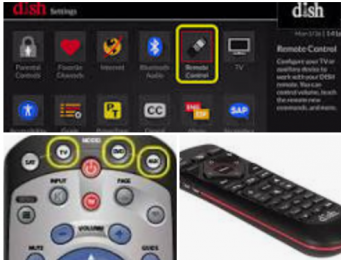
This article will explain step by step how to program your Dish remote to control your TV or another device like a DVD player or sound system. This article will be of great help to customers who experience one of the following scenarios:
- The volume on your remote is not working properly, but everything else is
- You recently purchased a new TV
- You recently purchased or received a new remote
Check Dish TV Balance: How to Check My Dish TV Account Balance & Track Recharge Status
How to Program dish Remote to TV
- Press the HOME button twice or the MENU button once, depending on your remote
- Select Settings
- Select Remote Control
- Arrow to and select the device code you want to learn
- Select the appropriate Pairing Wizard for the device
- Arrow to and select the brand of the device
- Select Next
- Press the VOLUME UP button to test the remote (if other than TV, press power button)
- If the remote works, select Finished
- If the remote does not work, select Try Next Code
- Repeat steps 8-10 until a working code is found. http://https//my.dish.comcomWhat is the 3 digit remote control code for dish?
The three-digit remote control code can be found here. Select 20.0, 20.1, 21.0, 21.1 as your remote type and the link to determine the three-digit code can be found in step 2. Press the POUND (#) button. The mode button you are programming will flash three times.

Frenzy valentine is a passionate blogger, developer, and entrepreneur. He is the founder and author of myfreshgists.com.
How can I reconnect my TV remote
Hold down the program button on the remote control for 3 seconds. This button mighty be displayed on the remote as “PRG.” When you have done this, the LED light on the remote control will turn on. …
Press the “TV” button on the remote control to let the remote know it will be syncing with a TV.